
Welcome back to AlgoVelgo’s Java journey! So far, every program we’ve written has used hardcoded values baked directly into the source code. Real programs need to react to the outside world—user input, files, network data. This guide bridges that gap by exploring Java type casting and input output, ensuring you know how to safely convert data and make your programs truly interactive.
Table of Contents
- Introduction to Java Type Casting and Input Output
- Implicit (Widening) Casting
- Explicit (Narrowing) Casting
- Casting Pitfalls: Overflow & Precision Loss
- Casting Between char and Numeric Types
- Basic Output: print, println, and printf
- Reading User Input with Scanner
- Visualizing Widening & Narrowing
- Code Walkthrough: BMI Calculator
Introduction to Java Type Casting and Input Output
Every time you convert a temperature from Celsius to Fahrenheit, calculate an average that might have decimals, or accept a user’s age as a whole number, you’re performing a type conversion. Java doesn’t let you silently mix types the way looser languages do; instead, it gives you clear rules for when a conversion happens automatically, and when you must request it yourself.
Alongside this, we’ll make our programs interactive by reading what a user types using the Scanner class!
Implicit (Widening) Casting
Widening conversion happens automatically without you writing anything special. Converting a “smaller” type to a “larger” type is always safe because the destination type can accommodate every possible value of the source type.
byte myByte = 100;
int myInt = myByte;      // implicit widening: byte → int (safe, automatic)

int wholeNumber = 42;
double decimalNumber = wholeNumber;  // implicit widening: int → double

System.out.println(myInt);         // 100
System.out.println(decimalNumber); // 42.0 — notice the automatic .0
Remember This: Widening never loses data. That’s exactly why Java allows the compiler to do it silently, without requiring you to ask for it explicitly.
Explicit (Narrowing) Casting
Narrowing conversion goes from a “larger” type to a “smaller” one and can lose data (precision or magnitude). Because of this risk, Java forces you to be explicit by writing a cast operator: (targetType) value.
double preciseValue = 9.78;
int wholeValue = (int) preciseValue;   // explicit narrowing: double → int
System.out.println(wholeValue);        // 9 — the decimal part is TRUNCATED!

long bigNumber = 130L;
byte smallNumber = (byte) bigNumber;   // explicit narrowing: long → byte
System.out.println(smallNumber);       // -126 — OVERFLOW! 130 doesn't fit in a byte
Common Mistake: Assuming
(int) 9.78rounds to10. It does not! Casting adoubleto anintalways truncates (chops off) the decimal part. For actual rounding, useMath.round().
Casting Pitfalls: Overflow & Precision Loss
Let’s understand why (byte) 130L gives -126.
A byte can only represent values from -128 to 127. When you force a larger value like 130 into a byte, Java simply keeps only the lowest 8 bits of the original value and reinterprets them. This is called overflow, and it happens silently without throwing an error.
130 in binary (wider type): ... 1000 0010
Keep only the lowest 8 bits:    1000 0010
Interpreted as a SIGNED byte:   -126
Similarly, when narrowing from double to float, you will often see precision loss as a float cannot hold as many decimal places.
Casting Between char and Numeric Types
Since char is fundamentally a 16-bit unsigned integer representing a Unicode character, casting between char and numeric types is common:
char letter = 'A';
int code = letter;             // implicit widening: char → int
System.out.println(code);      // 65

int number = 66;
char letterFromNumber = (char) number;  // explicit narrowing: int → char
System.out.println(letterFromNumber);   // 'B'
Basic Output: print, println, and printf
Java’s System.out object offers three related methods:
| Method | Behavior |
|---|---|
print(...) | Prints without moving to a new line afterward |
println(...) | Prints, then moves the cursor to a new line |
printf(...) | Prints using a format string with placeholders |
Formatted Output with printf
printf uses format specifiers (starting with %) to control how a value is displayed:
| Specifier | Meaning |
|---|---|
%d | Integer |
%f | Floating-point (default 6 decimal places) |
%.2f | Floating-point, rounded to 2 decimal places |
%s | String |
%n | Platform-independent newline |
String name = "Priya";
double salary = 55000.5;

System.out.printf("Name: %s, Salary: %.2f%n", name, salary);
// Output: Name: Priya, Salary: 55000.50
Reading User Input with Scanner
To read input from the user, Java provides the Scanner class inside the java.util package.
import java.util.Scanner;

public class UserInputDemo {
    public static void main(String[] args) {
        Scanner scanner = new Scanner(System.in);

        System.out.print("Enter your name: ");
        String name = scanner.nextLine();

        System.out.print("Enter your age: ");
        int age = scanner.nextInt();

        System.out.println("Hello, " + name + "! You are " + age + " years old.");
        scanner.close();
    }
}
The Infamous nextInt() + nextLine() Trap
This is one of the most common beginner frustrations in Java:
System.out.print("Enter your age: ");
int age = scanner.nextInt();     // user types "25" and presses Enter

System.out.print("Enter your name: ");
String name = scanner.nextLine(); // This gets an EMPTY string!
When you type 25 and press Enter, nextInt() reads the 25 but leaves the “newline” character in the buffer. When nextLine() runs, it immediately reads that leftover empty text.
The Fix: Add an extra scanner.nextLine() immediately after any numeric read!
int age = scanner.nextInt();
scanner.nextLine();  // consumes the leftover newline — the crucial fix!

String name = scanner.nextLine(); // now works correctly
Visualizing Widening, Narrowing & The Input Buffer
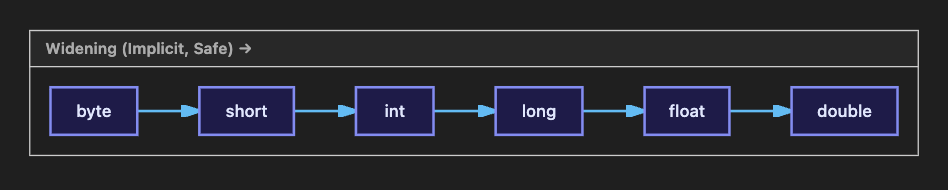
Visualizing the Leftover Newline Trap:
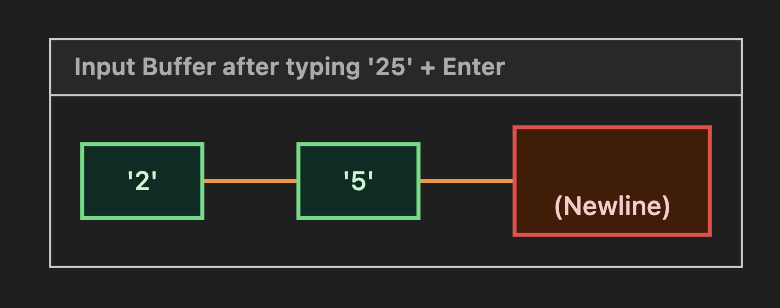
*The `nextInt()` reads the green `25`, leaving the dangerous red `\n` behind for the next `nextLine()` to instantly swallow!*
Code Walkthrough: BMI Calculator
Let’s build the BMI Calculator we motivated this article with:
import java.util.Scanner;

public class BmiCalculator {

    public static void main(String[] args) {

        Scanner scanner = new Scanner(System.in);

        System.out.print("Enter your weight in kg: ");
        double weightKg = scanner.nextDouble();

        System.out.print("Enter your height in cm: ");
        int heightCm = scanner.nextInt();  // user enters a whole number, e.g., 170

        // Narrowing isn't needed here — but we DO need a widening-safe conversion
        // from int (heightCm) into a decimal calculation:
        double heightM = heightCm / 100.0;  // dividing by 100.0 (a double) forces
                                             // decimal division, avoiding Part 3's
                                             // integer-division trap

        double bmi = weightKg / (heightM * heightM);

        System.out.printf("Your height in meters: %.2f%n", heightM);
        System.out.printf("Your BMI is: %.2f%n", bmi);

        scanner.close();
    }
}
Sample Run:
Enter your weight in kg: 68
Enter your height in cm: 170
Your height in meters: 1.70
Your BMI is: 23.53
Walkthrough
scanner.nextDouble()andscanner.nextInt()read typed input directly into the correct primitive types.heightCm / 100.0deliberately divides by a double literal (100.0, not100) to force decimal division — a direct callback to Part 3’s integer division gotcha.printfwith%.2fensures clean, professional-looking output instead of long floating-point decimals.
Common Mistakes Beginners Make
- Believing
(int)casting rounds instead of truncates. - Forgetting the extra
scanner.nextLine()afternextInt()/nextDouble()/etc., causing the nextnextLine()call to silently return an empty string. - Dividing by an
int(like100) instead of adouble(100.0) when a decimal result is needed, even after “fixing” the input types. - Assuming narrowing casts throw errors on overflow — they don’t; they silently wrap the value.
- Using
%fwithout specifying decimal precision, producing overly long output. - Forgetting to
import java.util.Scanner;at the top of the file — an easy miss for beginners copying partial code snippets. - Not closing the
Scanner(a minor resource-leak habit; more important once we cover resource management with try-with-resources in Part 23).
Best Practices
- Use
Math.round(),Math.floor(), orMath.ceil()when you need actual rounding behavior, not truncation via casting. - Always consume a leftover newline with an extra
scanner.nextLine()immediately after anynextInt()/nextDouble()/nextLong()call, if anextLine()call follows. - Prefer
printf/String.formatwith explicit precision (%.2f) for any output involving decimals meant for human consumption (money, measurements, percentages). - Create a single
Scannerinstance per program (tied toSystem.in) rather than creating multiple ones — multipleScannerobjects wrapping the same input stream can cause confusing, hard-to-debug behavior. - Close your
Scannerwhen you’re done with it (scanner.close()), especially as programs grow more complex.
Performance Considerations
- Casting between primitives (widening or narrowing) is an extremely cheap, near-instantaneous operation at the JVM level — there’s no meaningful performance concern here at the beginner stage.
Scanneris convenient but not the fastest input mechanism for reading very large volumes of data (e.g., competitive programming with huge inputs) — in performance-critical contexts, developers sometimes useBufferedReaderinstead. We’ll encounterBufferedReaderwhen we study Java I/O in depth in Part 34.printf/String.formatinvolve some parsing overhead for the format string, which is negligible for typical console output but worth knowing about if you’re formatting output in a tight loop processing millions of lines.
Frequently Asked Questions
Q1. Does casting a double to an int round to the nearest whole number?
No — it truncates (discards the decimal part entirely), regardless of whether the value is closer to the next whole number. Use Math.round() for actual rounding.
Q2. Why did my second scanner.nextLine() call return an empty string?
This is almost always the classic newline-leftover issue: a prior call to nextInt(), nextDouble(), etc., left the newline character in the input buffer, and your nextLine() call read that leftover instead of new input. Add an extra scanner.nextLine() right after the numeric read to fix it.
Q3. What happens if I try to narrow a value that doesn’t fit the target type?
The value silently overflows/wraps — Java does not throw an exception for this. You are responsible for ensuring the cast is safe when you write it explicitly.
Q4. Is there a difference between System.out.print and System.out.println?
Yes — print does not add a newline afterward; println does.
Q5. Can I cast a String to an int directly using (int)?
No — casting only works between compatible primitive types (or related object types, covered later in OOP). To convert a numeric String like "25" into an int, you use Integer.parseInt("25"), a topic we’ll formalize when we study wrapper classes in Part 25.
Interview Questions
Basic:
- What is the difference between implicit and explicit type casting?
- What does
(int) 9.9evaluate to, and why? - What is the purpose of the
Scannerclass?
Intermediate:
- Why does casting
130(as along) to abyteproduce-126? - Explain the classic
nextInt()followed bynextLine()bug, and how to fix it. - What’s the difference between
%fand%.2finprintf?
Advanced:
- Why doesn’t Java throw an exception on narrowing overflow, unlike some safety-focused languages?
- Explain how
charparticipates in Java’s widening conversion hierarchy, including its relationship toint. - What internal mechanism causes precision loss when narrowing a
doubleto afloat?
MCQs with Answers
Q1. What is the output of System.out.println((int) 7.8);?
a) 8
b) 7
c) 7.8
d) Compile error
Answer: b) 7 — casting truncates, it does not round.
Q2. Which of these is an example of widening conversion?
a) double to int
b) int to byte
c) int to double
d) long to int
Answer: c) int to double.
Q3. What does scanner.nextLine() read?
a) A single word
b) An entire line of text
c) Only an integer
d) Only a boolean
Answer: b) An entire line of text.
Q4. Which format specifier is used for a double rounded to 2 decimal places in printf?
a) %d
b) %.2f
c) %2f
d) %s
Answer: b) %.2f.
Q5. What is the most common cause of nextLine() unexpectedly returning an empty string?
a) The Scanner object wasn’t created properly
b) A leftover newline character from a prior nextInt()/nextDouble() call
c) Missing import statement
d) Using System.out instead of System.in
Answer: b) A leftover newline character from a prior numeric read.
Practice Coding Questions
- Write a program that reads a
doubletemperature in Celsius from the user and converts it to Fahrenheit, printing the result to 2 decimal places. - Demonstrate narrowing overflow by casting a
longvalue of300to abyteand printing the (surprising) result. - Write a program that reads a user’s full name (using
nextLine()) and age (usingnextInt()) in that specific order, correctly handling the newline trap. - Write a program that reads a character from the user (using
next().charAt(0)) and prints its underlying numeric Unicode value. - Use
printfto print a small formatted “receipt” with an item name (%s), quantity (%d), and price (%.2f), neatly aligned.
Hands-On Assignment
Assignment: “Simple Interactive Grade Calculator”
Create GradeCalculator.java that:
- Asks the user to enter marks for 3 subjects (as
intordouble, your choice — justify it in a comment). - Calculates the average using proper decimal division (recall Part 3!).
- Uses
printfto display the average to exactly 2 decimal places. - Reads the student’s name using
nextLine()— placed correctly relative to any numeric reads, to avoid the newline trap. - Prints a final formatted summary combining the name, individual marks, and average.
Summary of Key Takeaways
- Widening (implicit) casting happens automatically and safely, from smaller to larger types (
byte → short → int → long → float → double, withcharwidening intointand beyond). - Narrowing (explicit) casting requires a manual cast operator
(type)and can silently lose data through truncation or overflow — Java does not throw an error for this. (int)casting on a decimal value truncates, it does not round; useMath.round()for actual rounding.System.out.printfgives precise control over output formatting using format specifiers like%d,%.2f, and%s.Scannerreads user input, but mixingnextInt()/nextDouble()withnextLine()requires care to avoid the classic leftover-newline bug.
Revision / Cheat Sheet
| Concept | Rule |
|---|---|
| Widening | Automatic, safe, smaller → larger type |
| Narrowing | Manual (type) cast, risk of overflow/precision loss |
(int) 9.9 | Truncates to 9, does NOT round |
Math.round(9.9) | Rounds to 10 |
%d | Integer format specifier |
%.2f | Decimal format, 2 places |
%s | String format specifier |
nextInt() + nextLine() | Add extra scanner.nextLine() to consume leftover newline |
References
- Oracle Java Tutorials — Conversions and Promotions: Read Docs
- Oracle Java Docs — Scanner class: Read Docs
- Oracle Java Tutorials — Formatting: Read Docs
Conclusion
You’ve now unlocked two enormously practical skills: converting data safely between types, and making programs genuinely interactive by reading real user input. From this point forward, nearly every program in this roadmap will use Scanner at least occasionally, and the casting rules you learned here will resurface constantly — especially once we reach arrays, methods, and later, generics (Part 30). Take time to genuinely internalize the widening/narrowing distinction and the nextInt()/nextLine() trap; both are small details with outsized real-world impact.
Ready to give your programs real decision-making power? Check out Part 5 — Conditional Statements!