
Welcome back to AlgoVelgo’s Java journey! Now that you have the nouns of your program—the data—it’s time to introduce the verbs. Understanding Java operators and expressions is the crucial next step in making your programs actually do something. This guide will walk you through arithmetic, logic, and how Java evaluates complex decisions.
Table of Contents
- Introduction
- Understanding Java Operators and Expressions
- Arithmetic Operators
- Relational (Comparison) Operators
- Logical Operators
- Assignment Operators
- Unary and Ternary Operators
- Bitwise Operators
- Operator Precedence & Associativity
- Visualizing Expression Trees
- Code Walkthrough: Discount Engine
Introduction
Consider a simple sentence in English: “If the temperature is above 38 degrees and the patient is coughing, flag them for review.” Notice the structure—a comparison, a logical connector, another comparison, and an action. Nearly every decision your program will ever make is built from exactly this kind of structure, expressed through operators.
Operators are the small but mighty symbols (+, -, ==, &&) that transform simple variables into meaningful logic. Mastering them isn’t just about memorizing symbols; it’s about understanding precisely how Java evaluates them.
Understanding Java Operators and Expressions
An operator is a special symbol that performs an operation on one, two, or three values (called operands).
An expression is any valid combination of variables, literals, operators, and method calls that evaluates to a single value.
int result = (5 + 3) * 2;
//           └───┬───┘
//          expression → evaluates to 16
Arithmetic Operators
| Operator | Meaning | Example | Result |
|---|---|---|---|
+ | Addition | 5 + 3 | 8 |
- | Subtraction | 5 - 3 | 2 |
* | Multiplication | 5 * 3 | 15 |
/ | Division | 5 / 3 | 1 (integer division!) |
% | Modulus | 5 % 3 | 2 (remainder) |
Common Gotcha: When both operands are integers, Java performs integer division, discarding any decimal remainder.
7 / 2is3, not3.5! To get a decimal, at least one operand must be adouble(e.g.,7.0 / 2).
Relational (Comparison) Operators
Relational operators compare two values and always produce a boolean result (true or false).
| Operator | Meaning | Example | Result |
|---|---|---|---|
== | Equal to | 5 == 5 | true |
!= | Not equal to | 5 != 3 | true |
> | Greater than | 5 > 3 | true |
>= | Greater or equal | 5 >= 5 | true |
Important: Never use a single = (assignment) when you mean == (comparison) inside an if statement!
Logical Operators
| Operator | Meaning | Short-Circuits? |
|---|---|---|
&& | Logical AND | Yes |
|| | Logical OR | Yes |
! | Logical NOT | N/A |
Short-Circuit Evaluation
&& and || are called short-circuit operators because Java stops evaluating as soon as the result is determined. For example, in A && B, if A is false, Java doesn’t even bother looking at B because the overall statement can never be true! This is an excellent feature for both performance and safety.
Assignment Operators
Compound assignment operators (+=, -=, etc.) are shorter to type and implicitly handle safe type conversions.
| Operator | Equivalent To | Example |
|---|---|---|
= | — | x = 5 |
+= | x = x + y | x += 5 |
-= | x = x - y | x -= 5 |
*= | x = x * y | x *= 5 |
/= | x = x / y | x /= 5 |
%= | x = x % y | x %= 5 |
int score = 10;
score += 5;   // score is now 15
score *= 2;   // score is now 30
score -= 10;  // score is now 20
score /= 2;   // score is now 10
score %= 3;   // score is now 1 (remainder of 10/3)
Unary Operators
Unary operators act on a single operand.
| Operator | Meaning | Example |
|---|---|---|
+ | Unary plus | +5 |
- | Unary minus (negation) | -5 |
++ | Increment by 1 | x++ or ++x |
-- | Decrement by 1 | x-- or --x |
! | Logical NOT | !true → false |
Here is how these look in practice:
int x = 10;
int y = -x;       // Unary Minus: y is now -10
int z = +5;       // Unary Plus: z is 5 (rarely used, as numbers are positive by default)

x++;              // Post-increment: x becomes 11
boolean isRunning = true;
isRunning = !isRunning; // Logical NOT: isRunning becomes false
🚀 Interview Tip (Pre vs Post Increment):
a++(post-increment) returns the original value before adding 1.++a(pre-increment) returns the new value after adding 1.
Ternary Operators (?:)
The ternary operator is Java’s only operator that takes three operands. It’s a compact alternative to simple if-else logic.
Syntax: condition ? valueIfTrue : valueIfFalse
int age = 20;
String category = (age >= 18) ? "Adult" : "Minor";
// category becomes "Adult"
Bitwise Operators
Bitwise operators work directly on the individual bits (0s and 1s) of integer types. They are essential in systems programming, performance-critical code, and cryptography.
| Operator | Description |
|---|---|
& | Bitwise AND |
| | Bitwise OR |
^ | Bitwise XOR |
<< | Left shift |
>> | Signed right shift |
>>> | Unsigned right shift |
int a = 5;   // binary: 0101
int b = 3;   // binary: 0011

System.out.println(a & b);  // 0001 → 1  (AND)
System.out.println(a | b);  // 0111 → 7  (OR)
System.out.println(a ^ b);  // 0110 → 6  (XOR)
System.out.println(~a);     // -6 (NOT: inverts all bits, including the sign bit)
Visualizing Bitwise Logic
To understand how these operators produce their results, line up the binary bits. Each column is compared independently based on the operator’s rule.
Bitwise AND (&)
A 1 results only when both bits in the column are 1:
   0101   (5)
 & 0011   (3)
 ------
   0001   (1)
Bitwise OR (|)
A 1 results when at least one bit in the column is 1:
   0101   (5)
 | 0011   (3)
 ------
   0111   (7)
Bitwise XOR (^)
A 1 results only when the bits in the column are different:
   0101   (5)
 ^ 0011   (3)
 ------
   0110   (6)
Bitwise NOT (~)
This operates on a single number. It simply flips every 0 to 1, and every 1 to 0 (which also flips the sign bit):
 ~ 0101   (5)
 ------
   1010   (-6)
Visualizing Bitwise Shifts
Bitwise shifts can be confusing, so let’s visualize them! Imagine a number is just a row of boxes holding 0s and 1s. Shifting means pushing all the boxes left or right.
Left Shift (<<) — Multiplying by 2
When we do 5 << 1, we push all the bits left by 1 position and fill the empty space on the right with a 0.

Right Shift (>>) — Dividing by 2
When we do 10 >> 1, we push all the bits right by 1 position. The bit that falls off the right edge is deleted!

Pro Tip: x << 1 is a blazing fast way to multiply a number by 2 at the CPU level, and x >> 1 divides it by 2!
Operator Precedence & Associativity
When an expression contains multiple operators, Java uses precedence rules to decide which operation happens first.
int result = 5 + 3 * 2; // Multiplication happens first! Result is 11.Golden Rule: Never rely purely on memorized precedence rules. Use parentheses generously—they cost nothing at runtime and make your code infinitely easier to read: 5 + (3 * 2).
Visualizing Expression Trees
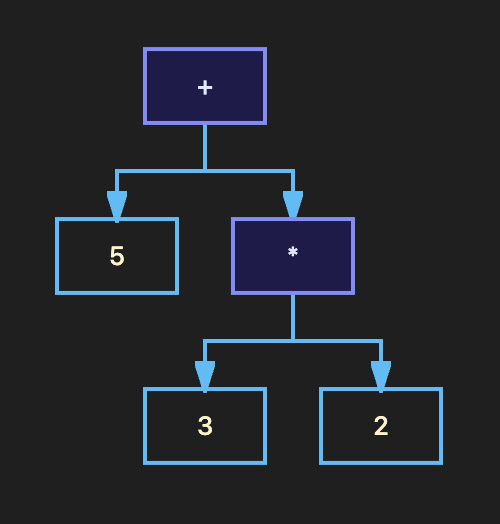
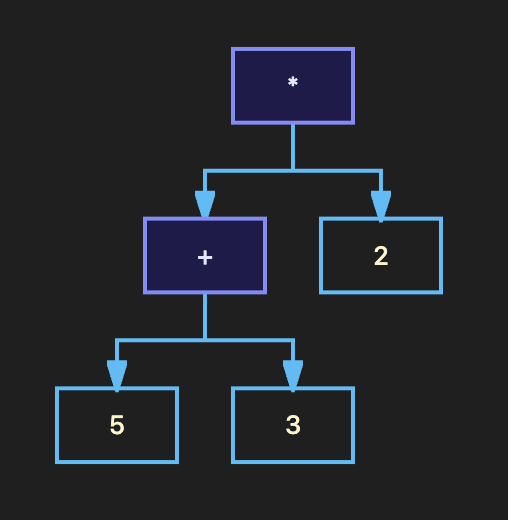
Expressions can be understood as trees, where operators are nodes and operands are leaves. Java evaluates from the bottom upward.
Tree 1: 5 + 3 * 2
Without parentheses, Multiplication (*) is evaluated deepest in the tree.
Tree 2: (5 + 3) * 2
Parentheses force the Addition (+) to be evaluated first, flipping the tree structure!
Code Walkthrough: Discount Engine
Let’s build a realistic Discount Calculator, tying together arithmetic, relational, logical, and the ternary operator:
public class DiscountCalculator {
    public static void main(String[] args) {
        boolean isPremium = true;
        double cartTotal = 2500.0;

        // Logical & Relational
        boolean discountEligible = (isPremium && cartTotal > 2000);

        // Ternary Operator
        double discountRate = discountEligible ? 0.20 : 0.0;

        // Arithmetic
        double finalAmount = cartTotal - (cartTotal * discountRate);

        System.out.println("Final Amount: $" + finalAmount);
    }
}
Want to dive deeper into how the JVM processes these mathematical structures? Be sure to check out the official Oracle documentation on Java operators and expressions.
Ready for the next step? Stay tuned to AlgoVelgo’s Java series, where we will dive into Type Casting & Input/Output in our next tutorial!