
Welcome back to AlgoVelgo’s Java journey! Understanding Java variables and data types is the most crucial step after setting up your environment. Now that you know how Java works behind the scenes, it’s time to learn how to store and manipulate data. This guide will walk you through Java’s strict but powerful type system.
Table of Contents
- Introduction
- What Is a Variable?
- Java’s Type System: Primitive vs Reference
- The Eight Primitive Types — In Depth
- Reference Types — A First Look
- Variable Declaration & Initialization
- Literals in Java
- Constants with final
- Naming Conventions
- Visualizing Memory Layout
- Code Walkthrough
- Best Practices & Common Mistakes
Introduction
Every meaningful program, from a calculator to a banking system, does one fundamental thing: it stores and manipulates data. Before you can add two numbers, check someone’s age, or store a name, you need a way to hold that information in memory and give it a label you can refer to later.
That’s exactly what variables are for. But Java, being a language obsessed with reliability and predictability, doesn’t let you just throw any kind of data into a variable carelessly—it insists you declare what kind of data a variable will hold upfront. This is called static typing, and it’s one of the defining characteristics of Java.
Understanding Java Variables and Data Types
A variable is a named location in memory that holds a value, which can change (“vary”) during program execution.
Think of a variable like a labeled box. You can look inside the box (read the value), or replace what’s inside (reassign the value), but the label (variable name) and the type of thing that fits in the box stay fixed once declared.
Java’s Type System: Primitive vs Reference
Java has exactly two categories of types. Let’s visualize how they are structured:
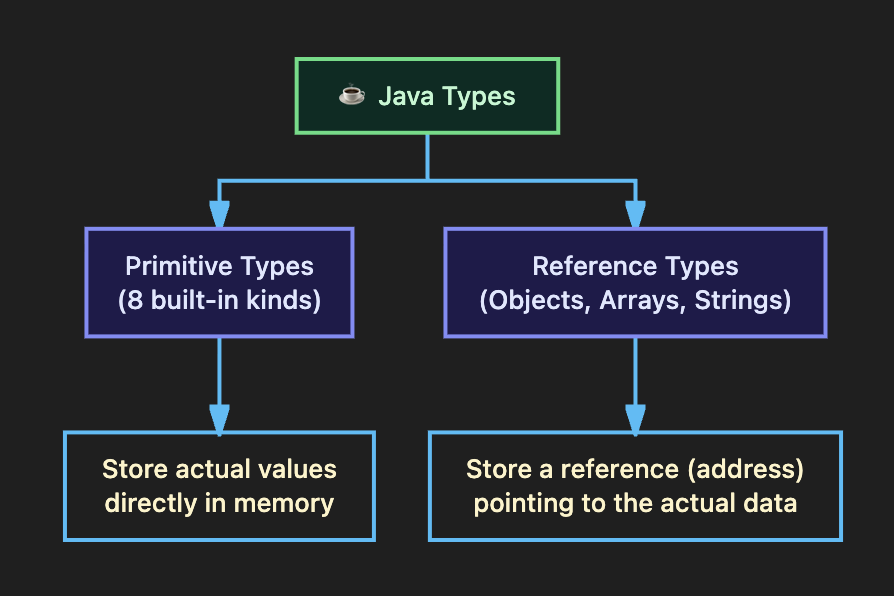
- Primitive types hold their actual value directly in the memory location of the variable. There are exactly 8 of them.
- Reference types hold a reference (a memory address) pointing to where the actual object data lives on the heap.
The Eight Primitive Types — In Depth
| Type | Size | Range (approx.) | Default | Example Use Case |
|---|---|---|---|---|
byte | 8 bits | -128 to 127 | 0 | Small counters, raw file data |
short | 16 bits | -32,768 to 32,767 | 0 | Rarely used today |
int | 32 bits | ≈ -2.1B to 2.1B | 0 | Most common for whole numbers |
long | 64 bits | Enormous | 0L | Timestamps, global population |
float | 32 bits | ~6-7 decimal digits | 0.0f | Memory-sensitive decimals |
double | 64 bits | ~15-16 decimal digits | 0.0d | Default choice for decimals |
char | 16 bits | 0 to 65,535 | ‘\u0000’ | Single characters: ‘A’, ‘$’ |
boolean | JVM-dep | true or false | false | Flags, conditions, yes/no |
Why Does the ‘L’ and ‘f’ Suffix Matter?
By default, Java treats any whole number literal (like 100) as an int, and any decimal literal (like 3.14) as a double.
If you write long bigNumber = 9000000000; without the L suffix, Java tries to fit it into an int first, causing a crash! Always use 9000000000L. Similarly, use 199.99f for floats.
Reference Types — A First Look
While full coverage of reference types comes later, you need one right away for any practical program: String.
String name = "Aditi Sharma";Notice the double quotes for String, versus single quotes for char. This is a strict rule in Java! Even though String looks like a primitive, it is technically a class, and name holds a reference to a String object living elsewhere in memory.
Variable Declaration & Initialization
Declaration tells the compiler a variable’s name and type. Initialization gives it a starting value.
int age;           // Declaration only
age = 21;          // Initialization

int height = 175;  // Declaration + Initialization combined (Best Practice)
💡 Important: Java will throw a compile error if you try to use a local variable before initializing it. Java refuses to let you accidentally use “garbage” memory values!
Literals in Java
A literal is a fixed value written directly into your source code. Java also supports literals in different number systems, and you can even use underscores for readability!
int binary     = 0b11010;        // base 2 (prefix 0b)
int hex        = 0x1A;           // base 16 (prefix 0x)
int population = 1_400_000_000;  // underscores for readability
Constants with final
Sometimes, a value should never change after it’s set. Java lets you enforce this using the final keyword.
final double PI = 3.14159;Once assigned, any attempt to reassign a final variable causes a compile-time error.
Naming Conventions
Following conventions isn’t optional in professional settings—it’s expected.
| Element | Convention | Example |
|---|---|---|
| Variables & Methods | camelCase | studentAge, calculateTotal() |
Constants (final) | UPPER_SNAKE_CASE | MAX_SPEED, PI |
| Classes | PascalCase | HelloWorld, BankAccount |
Hard Rules: Names cannot start with a digit, they are case-sensitive, and you cannot use reserved keywords like class or int as a name.
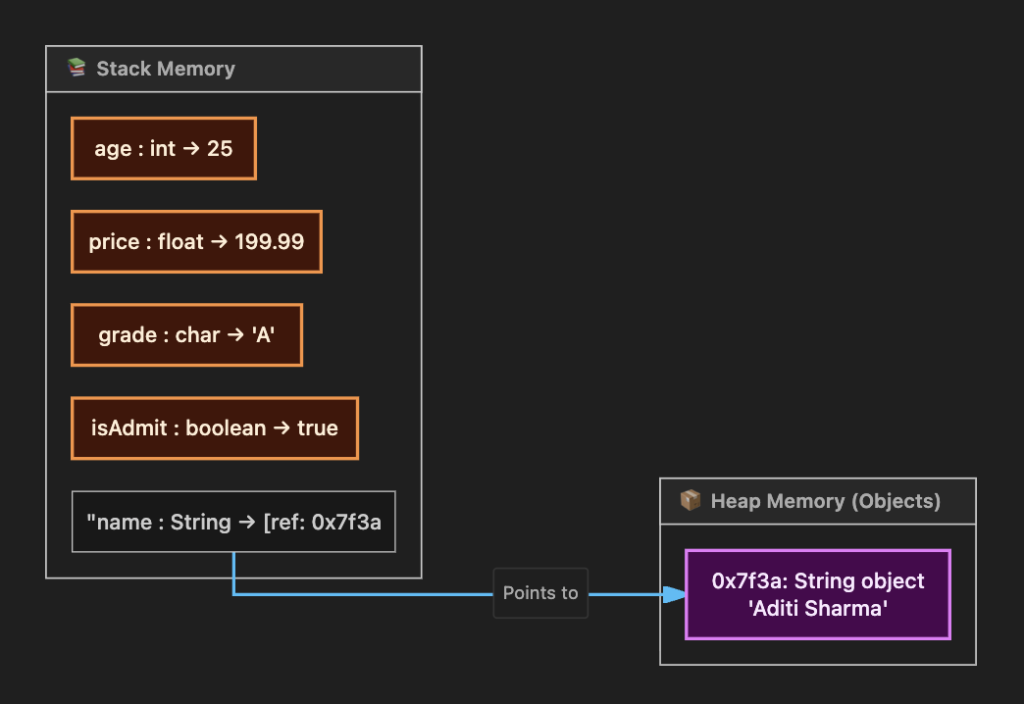
Visualizing Memory Layout
Here is the single most important structural difference between Primitives and References. Primitives live directly in the variable’s memory slot (Stack), while reference types store an address pointing to the Heap.
Code Walkthrough: Student Profile
Let’s write a complete, realistic example:
public class StudentProfile {
    public static void main(String[] args) {
        int rollNumber = 24;
        double averageMarks = 87.65;
        char grade = 'A';
        boolean isPassed = true;
        String studentName = "Rohan Verma";
        final int MAX_MARKS = 100;

        System.out.println("----- Student Profile -----");
        System.out.println("Name        : " + studentName);
        System.out.println("Average     : " + averageMarks + " / " + MAX_MARKS);
        System.out.println("Passed?     : " + isPassed);
    }
}
Best Practices & Common Mistakes
- Default to
intanddoubleunless you have a specific reason to usebyteorfloat. - Use
finalliberally for values that logically should never change. - Don’t use
doublefor currency. Due to floating-point math quirks,0.1 + 0.2does not exactly equal0.3. Professionals useBigDecimalfor money! - Avoid Integer Overflow. Choosing
intfor a value that exceeds ~2.1 billion will silently wrap around to a negative number.
Ready for the next step? Stay tuned to AlgoVelgo’s Java series, where we will dive into Operators & Expressions in our next tutorial!