
Welcome back! In our last tutorial, we mastered Strings. Every program we’ve written so far has lived entirely inside a single main block—growing longer and messier with every new feature. Today, we fix that. We’re introducing Java Methods: the fundamental tool for breaking a program into small, reusable, named blocks of logic. This is arguably the biggest step up in your coding journey so far, and the direct bridge to Object-Oriented Programming.

Table of Contents
- Why Do We Need Methods?
- What Exactly Is a Method?
- The Anatomy of a Method
- Calling Methods
- Parameters vs Arguments
- Return Types and
return - The
voidReturn Type - Method Overloading
- Pass-by-Value: A Deep Dive
- Scope of Variables
- Static Methods (A First Look)
- Varargs (Variable Arguments)
- Visualizing the Call Stack
- Code Walkthrough: Grade Report
- Common Mistakes Beginners Make
- Best Practices in the Real World
- Performance Considerations
- Frequently Asked Questions (FAQ)
- Interview Prep Questions
- Test Your Knowledge (MCQs)
- Practice Coding Questions
- Hands-On Assignment
- Mini Challenge: Pass-by-Value Detective
- Summary and Cheat Sheet
Why Do We Need Methods?
Imagine you’re building a billing system for a retail store. Throughout the program, you need to calculate an 18% tax on a price. If you just type out the math formula every single time you need it, you are going to have duplicate code scattered everywhere. What happens when the tax rate changes to 20%? You’d have to hunt down every single formula and change it manually.
With a method, you write the logic exactly once:
static double calculateTax(double amount) {
    return amount * 0.18; // 18% tax rate
}
Now, you can just call calculateTax(price) wherever you need it! Fixing a bug or updating the rate now requires changing exactly one place. Write once, use everywhere, fix in one place.
What Exactly Is a Method?
A method (often called a function in other languages) is a named, reusable block of code that performs a specific task.
You’ve actually been using a method since day one: main is a method! You’ve also been calling built-in methods extensively, like System.out.println() and scanner.nextInt(). Now, we learn to write our own.
The Anatomy of a Method
Let’s break down how to build one.
public static int addNumbers(int a, int b) {
    int sum = a + b;
    return sum;
}
Let’s look at the signature piece by piece:
public: The access modifier (who is allowed to see this method).static: Means this method belongs to the class itself, not to a specific object.int: The return type. This method promises to give back an integer.addNumbers: The name of the method (written in camelCase).(int a, int b): The parameter list. The inputs this method expects.{ ... }: The body containing the actual code!
Calling Methods
Once written, you call a method by writing its name and passing it some data.
public class Calculator {

    public static void main(String[] args) {
        int result = addNumbers(5, 3);  // CALLING the method!
        System.out.println(result);     // Prints 8
    }

    public static int addNumbers(int a, int b) {
        return a + b;
    }
}
Note: The order in which methods are written inside the file doesn’t matter. main can call addNumbers even if it is written further down the page.
Parameters vs Arguments
These words get mixed up all the time. Here is the strict definition:
- Parameters are the placeholder variables in the method’s definition (e.g.,
int a, int b). - Arguments are the actual values you pass in when you call it (e.g.,
5, 3).
Return Types and `return`
A method’s return type declares what kind of data it sends back. The return keyword is what actually sends that data back to the caller.
Crucial Rule: The moment Java hits a return statement, it instantly exits the method. No code below the return will run!
static String classifyAge(int age) {
    if (age < 0) {
        return "Invalid age";  // Exits IMMEDIATELY if age is negative!
    }
    if (age < 18) {
        return "Minor";        // Exits here if they are under 18!
    }
    return "Adult";            // Only runs if the above were skipped.
}
This is called an “early return” and it is fantastic for keeping your code clean and avoiding massive, messy if-else blocks.
The ‘void’ Return Type
What if your method doesn’t need to hand any data back? What if it just prints something to the screen? You use void.
static void greet(String name) {
    System.out.println("Hello, " + name + "!");
    // No return statement needed!
}
Method Overloading
Method overloading means creating multiple methods that share the exact same name, as long as they accept different parameters.
static int add(int a, int b) {
    return a + b;
}

static double add(double a, double b) {
    return a + b;
}

static int add(int a, int b, int c) {
    return a + b + c;
}
Java is smart enough to know which one you meant based on the arguments you provide. If you say add(2.5, 3.5), it automatically triggers the double version!
Pass-by-Value: A Deep Dive
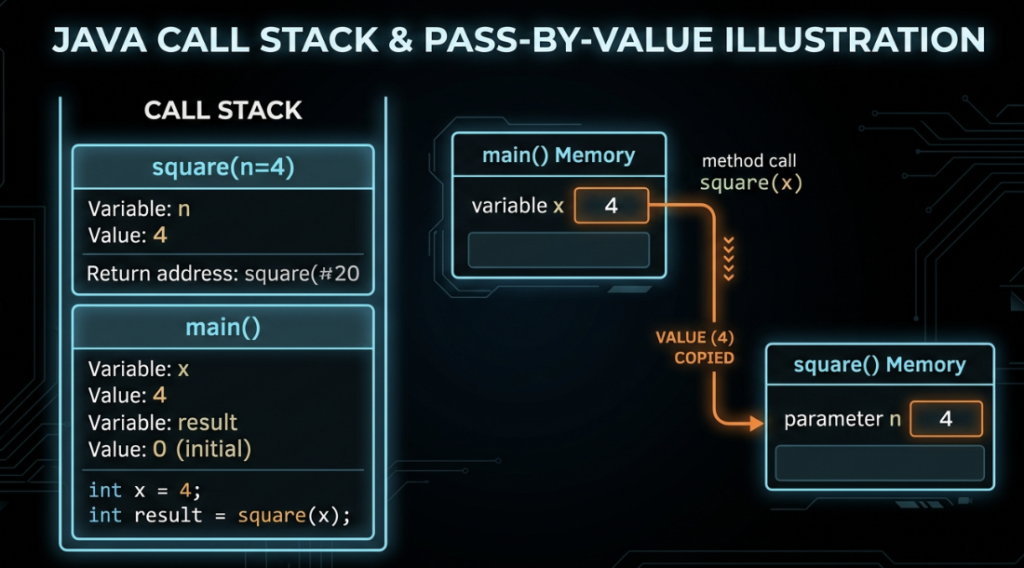
This is a favorite interview question. Java is strictly Pass-By-Value. There are zero exceptions.
Passing Primitives
When you pass a primitive (like an int), Java makes a photocopy of the value and hands it to the method.
static void tryToDouble(int number) {
    number = number * 2;  // Modifies the COPY only!
}

int x = 5;
tryToDouble(x);
System.out.println(x); // Still 5! The original is perfectly safe.
Passing Reference Types (Arrays, Objects)
When you pass an array, Java still passes by value—but the value it copies is the memory address (reference)!
static void doubleFirstElement(int[] arr) {
    arr[0] = arr[0] * 2;
}

int[] numbers = {5, 10, 15};
doubleFirstElement(numbers);
System.out.println(numbers[0]); // 10! The array WAS modified!
Because both variables hold a copy of the same memory address, editing the data inside the array edits the original!
However, you cannot re-assign the variable to a completely new object:
static void tryToReplace(int[] arr) {
    arr = new int[]{100, 200, 300};  // This only changes the local copy of the address!
}
// The original array outside the method remains totally unchanged.
Scope of Variables
Variables created inside a method (or a loop) only exist inside that specific block. This is called Local Scope.
static void methodA() {
    int score = 100;
}

static void methodB() {
    System.out.println(score); // ERROR! methodB has no idea what 'score' is.
}
Static Methods (A First Look)
For now, just know that static means the method belongs to the Class itself, not to an Object. Because our main method is static, any helper methods we write right next to it also need to be static so they can talk to each other easily. We will dive deep into this when we cover Object-Oriented Programming in Part 13.
Varargs (Variable Arguments)
What if you want a method to accept an unknown amount of numbers? Use ...!
static int sumAll(int... numbers) {
    int total = 0;
    for (int num : numbers) {  // It behaves exactly like an array!
        total += num;
    }
    return total;
}

System.out.println(sumAll(1, 2, 3));          // 6
System.out.println(sumAll(10, 20));           // 30
System.out.println(sumAll());                 // 0
⚠ Rule: A varargs parameter must always be the very last parameter in the list.
Visualizing the Call Stack
Every time a method is called, Java stacks a new “frame” of memory on top of the last one. When a method hits return, its frame is destroyed and popped off the stack. Here is exactly how that looks:
Code Walkthrough: Grade Report
Let’s build a clean, modular program by breaking tasks into separate methods!
import java.util.Scanner;

public class GradeReportGenerator {

    public static void main(String[] args) {
        int[] marks = {85, 92, 78};

        // main() is clean and just delegates tasks to our methods!
        double average = calculateAverage(marks);
        String grade = getGrade(average);

        printReport(marks, average, grade);
    }

    static double calculateAverage(int[] marks) {
        int sum = 0;
        for (int mark : marks) sum += mark;
        return (double) sum / marks.length;
    }

    // Overloaded Method 1
    static String getGrade(double average) {
        if (average >= 90) return "A";
        if (average >= 75) return "B";
        if (average >= 60) return "C";
        return "F";
    }

    // Overloaded Method 2
    static String getGrade(double average, double passingThreshold) {
        if (average < passingThreshold) return "F (Failed Custom Threshold)";
        return getGrade(average); // Calling the other method!
    }

    static void printReport(int[] marks, double average, String grade) {
        System.out.println("\n---- Grade Report ----");
        System.out.printf("Average: %.2f%n", average);
        System.out.println("Grade: " + grade);
    }
}
Common Mistakes Beginners Make
- Forgetting
return. If your method promises anint, you must ensure it hits a return statement no matter what path the logic takes. - Shadowing variables. Creating a variable inside a method that shares the same name as a global variable. It causes massive confusion.
- Putting Varargs first.
static void test(int... nums, String name)will crash. Varargs must be last! - Giant Methods. If your method is 200 lines long, it is probably doing too much. Break it down!
Best Practices in the Real World
- Action-Oriented Names: Methods do things. Name them with verbs like
calculateTotal(),fetchData(), orprintReport(). - Single Responsibility: A method should do one thing and do it well.
- Early Returns: Don’t nest 5
ifstatements inside each other. If a condition is bad, justreturnimmediately and exit the method.
Performance Considerations
- Calling a method does take a microscopic amount of time to build a stack frame. But it is so fast you should never worry about it. Writing clean, readable code with lots of methods is infinitely better than writing one giant block of spaghetti code.
- Passing giant arrays to a method is lightning fast because Java only passes the small memory address pointer, not the millions of data points inside!
Frequently Asked Questions (FAQ)
Q1. What is the difference between a parameter and an argument?
Parameters are the placeholders in the definition. Arguments are the actual data you pass in.
Q2. Can I overload methods just by changing the return type?
No! Java gets confused. You have to change the amount or type of the parameters to successfully overload a method.
Q3. Is Java Pass-by-Reference?
No. Java is always Pass-by-Value. When dealing with arrays/objects, it passes a copy of the memory address (reference).
Test Your Knowledge (MCQs)
Q1. What is the output?
static void modify(int x) { x = x + 10; }
int a = 5;
modify(a);
System.out.println(a);
a) 15
b) 5
Answer: b) 5. Primitives are passed by value; the method only edited a photocopy.
Q2. What is the output?
static void modify(int[] arr) { arr[0] = 99; }
int[] nums = {1, 2, 3};
modify(nums);
System.out.println(nums[0]);
a) 1
b) 99
Answer: b) 99. The array content is modified through the shared reference pointer!
Q3. Which is a valid overload of int add(int a, int b)?
a) double add(int a, int b)
b) int add(int a, int b, int c)
Answer: b) It differs in the number of parameters.
Practice Coding Questions
- Write a method
isEven(int number)that returns aboolean. - Write an overloaded method
maxthat finds the highest number between two ints, and another that finds the highest between three ints. - Write a varargs method
printAll(String... items)that prints everything passed to it. - Pass an array to a method, try to reassign it to
new int[]{1,2,3}inside the method, and prove that the original array outside the method didn’t change!
Hands-On Assignment: Math Utils
Create MathUtils.java:
- Create
factorial(int n)that uses a loop to return the factorial. - Create
isPrime(int n)that returns a boolean. - Create
reverseArray(int[] arr)that returns a brand new reversed array. - Create a varargs
average(double... numbers). - Call all of them from
main!
Mini Challenge: Pass-by-Value Detective
Write a program with clear comments explaining Pass-by-Value:
- Prove a primitive variable isn’t affected by a method.
- Prove an array’s content IS affected by a method.
- Prove that reassigning an array parameter to a brand new array inside a method does NOT affect the original array.
Summary and Cheat Sheet
- Methods break code down into reusable blocks.
- Pass-by-value is the golden rule. Primitives are photocopied. Arrays pass a copy of their memory address.
voidmeans no return value.- Overloading lets you reuse names if the parameters differ.
- Varargs (
...) let you pass infinite arguments, as long as it’s the last parameter!
Your Quick Methods Cheat Sheet
| Concept | Syntax / Rule |
|---|---|
| Definition | returnType methodName(params) { } |
| Overloading | Same name, different parameters |
| Pass-by-Value | Java ALWAYS copies the value (or address) |
| Varargs | int... nums (Must be the last param!) |
Further Reading
- Official docs: Oracle Java Tutorials — Defining Methods
Conclusion
You just leveled up. Methods are the absolute backbone of good software architecture. Understanding how data gets passed into them (Pass-By-Value) and how they return data is a critical milestone.
Practice writing those helper methods. In Part 11, we are going to melt your brain a little bit with Recursion—what happens when a method calls itself?
Ready for the challenge? Check out Part 11 — Recursion!