
Welcome to Phase 2 of your Java journey! Over the first 12 parts, we built a rock-solid foundation in “Procedural Programming”—writing code as a top-to-bottom sequence of instructions. It works great for small programs like our Calculator. But as software scales up to thousands of lines, that style breaks down. Today, we step into a fundamentally different, infinitely more powerful way to organize code: Object-Oriented Programming (OOP).
Table of Contents
- Why Do We Need OOP?
- Procedural vs Object-Oriented Programming
- What Exactly Is a Class?
- What Exactly Is an Object?
- Fields and Methods: The Two Halves of a Class
- The
newKeyword: Bringing Objects to Life - References Revisited: Pass-by-Value Returns
- The Power of Multiple Objects
- The Four Pillars of OOP (A Preview)
- Code Walkthrough: Student Record System
- Common Mistakes Beginners Make
- Best Practices in the Real World
- Frequently Asked Questions (FAQ)
- Interview Prep Questions
- Test Your Knowledge (MCQs)
- Practice Coding Questions
- Hands-On Assignment
- Mini Challenge: Object Reference Tracer
- Summary and Cheat Sheet
Why Do We Need OOP?
Think about how you naturally describe the real world. You don’t think of a “Car” as a bunch of loose, unrelated variables (speed, fuelLevel) floating around independently from functions like accelerate(). You think of a car as one thing that has properties (speed, fuel) and does things (accelerate).
If you try to build a Library Management System using the old “procedural” style, you end up doing terrible things like making parallel arrays:
String[] titles = new String[1000];
String[] authors = new String[1000];
boolean[] isAvailable = new boolean[1000];
This is a nightmare to manage. If you sort the titles array but forget to sort the authors array, everything is instantly corrupted.
Object-Oriented Programming fixes this by bundling related data and behavior into a single, unbreakable unit. You create a Book class, and then you just make Book objects.
Procedural vs Object-Oriented Programming
| Feature | Procedural Programming (Phase 1) | Object-Oriented Programming (Phase 2) |
|---|---|---|
| Focus | “What steps happen, and in what order?” | “What things exist, and what can they do?” |
| Data Storage | Loose variables, parallel arrays | Objects holding their own specific data |
| Organization | Functions and data are completely separate | Data and behavior are bundled together |
Note: OOP doesn’t replace what you’ve learned. Variables, loops, and if statements are all still used heavily inside of classes!
What Exactly Is a Class?
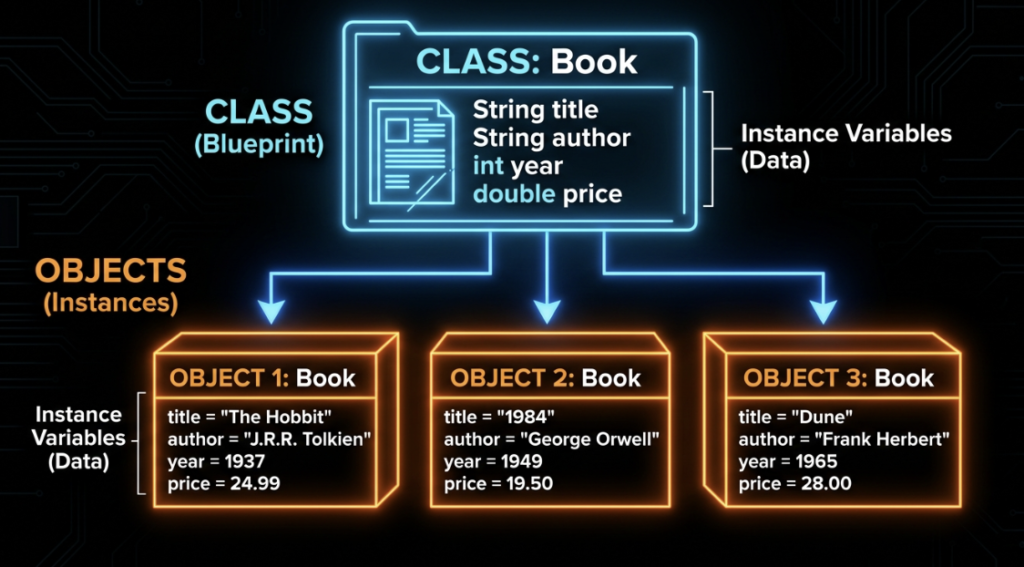
A class is a blueprint (or template) that defines what kind of data and what behaviors a specific type of object will have.
By itself, a class is not a real thing. It is just the design.
public class Book {

    // The DATA every Book will have
    String title;
    String author;
    boolean isAvailable;

    // The BEHAVIOR every Book can do
    void checkOut() {
        isAvailable = false;
        System.out.println("\"" + title + "\" has been checked out.");
    }
}
Think of a class like an architect’s blueprint for a house. The blueprint says “every house of this design has 3 bedrooms.” But you can’t sleep in a blueprint. You have to actually build the house first.
What Exactly Is an Object?
An object is a specific, concrete instance built from a class blueprint. It is the actual “house” you can sleep in, with its own specific data.
Book myBook = new Book(); // We just built the house!
myBook.title = "The Hobbit";
myBook.author = "J.R.R. Tolkien";
myBook.isAvailable = true;

myBook.checkOut(); // Prints: "The Hobbit" has been checked out.
Here, myBook is the object.
Fields and Methods: The Two Halves of a Class
Let’s define the two things that live inside a class:
- Fields (Instance Variables): The variables declared inside the class. This is the data. (e.g.,
title,author). - Methods: The functions declared inside the class. This is the behavior. (e.g.,
checkOut()).
Notice how checkOut() uses the variable isAvailable without us having to pass it in as a parameter? This is a massive shift from Phase 1. Instance methods automatically have access to their own object’s fields!
The `new` Keyword: Bringing Objects to Life
The new keyword is what actually creates an object in memory and hands you back a reference to it.
Book myBook = new Book();When Java hits this line:
new Book()allocates memory on the Heap for a brand-new object.- It initializes the fields to their defaults (
nullfor Strings,falsefor booleans). Book myBook =stores the memory address (reference) of that new object inside the variable.
References Revisited: Pass-by-Value Returns
If you recall from Part 10, Java passes arrays by copying the memory reference. Objects work exactly the same way!
Book book1 = new Book();
book1.title = "Dune";

Book book2 = book1; // ⚠ WARNING: This copies the memory address, NOT the object!

book2.title = "1984";

System.out.println(book1.title); // Prints "1984" !!!
Because book1 and book2 are holding the exact same memory address, changing the title through book2 changes the title for book1. They are looking at the exact same object in memory!
The Power of Multiple Objects
The true power of OOP unlocks when you create many independent objects from a single class blueprint.
Book book1 = new Book();
book1.title = "The Hobbit";
book1.isAvailable = true;

Book book2 = new Book();
book2.title = "1984";
book2.isAvailable = true;

book1.checkOut(); // Only affects book1!

System.out.println(book1.isAvailable); // false
System.out.println(book2.isAvailable); // true
Each object has its own completely independent copy of the fields. Modifying one has zero impact on the other.
The Four Pillars of OOP (A Preview)
Object-Oriented Programming rests on four massive concepts. We will cover them in depth in future tutorials, but here is your preview map:
- Encapsulation (Part 16): Hiding an object’s internal data so other code can’t accidentally break it.
- Inheritance (Part 17): Allowing a new class (like
SportsCar) to inherit all the fields and methods of an existing class (likeCar). - Polymorphism (Part 18): Allowing objects of different types to be treated as if they were the same type.
- Abstraction (Part 19): Hiding complex background details and only showing the user what is absolutely necessary.
Code Walkthrough: Student Record System
Let’s build a program using everything we just learned. Notice we have two classes in this file!
// File: StudentRecordDemo.java

public class StudentRecordDemo {
    public static void main(String[] args) {

        // 1. Instantiate three independent Student objects
        Student student1 = new Student();
        student1.name = "Ananya Rao";
        student1.rollNumber = 101;
        student1.marks = 88.5;

        Student student2 = new Student();
        student2.name = "Rohan Verma";
        student2.marks = 76.0;

        // 2. Call methods on specific objects
        student1.displayDetails();
        student2.displayDetails();

        // 3. Modify one specific object
        student2.addBonusMarks(5.0);
        System.out.println("\nAfter bonus marks:");
        student2.displayDetails(); // Only Rohan's marks went up!
    }
}

// The Blueprint Class!
class Student {
    String name;
    int rollNumber;
    double marks;

    void displayDetails() {
        System.out.println("\n---- Student Record ----");
        System.out.println("Name       : " + name);
        System.out.printf("Marks      : %.2f%n", marks);
    }

    void addBonusMarks(double bonus) {
        marks += bonus; // Modifies THIS specific object's data
    }
}
Common Mistakes Beginners Make
- Confusing a Class with an Object. A class is the blueprint. An object is the actual data in memory. (Interviewers ask this constantly!).
- Forgetting the
newkeyword. DoingBook myBook;just creates an empty variable. If you try to domyBook.title = "Dune";Java will crash with aNullPointerException. - Thinking
book2 = book1creates a copy. It doesn’t. It just copies the memory address.
Best Practices in the Real World
- PascalCase for Classes. Class names must always start with a capital letter (e.g.,
BankAccount, notbankAccount). - Noun-based Names. Classes represent things. Name them
StudentorCar. Don’t name a classCalculateMath. - Single Responsibility. Keep each class focused on modeling exactly one concept.
Frequently Asked Questions (FAQ)
Q1. Do instance methods need parameters to access an object’s fields?
No! When you call myBook.checkOut(), the method automatically has access to myBook‘s fields. This is why we dropped the static keyword from our methods.
Q2. Can a single .java file contain more than one class?
Yes, as you saw in our walkthrough! However, only one class can be labeled public, and that public class must exactly match the filename.
Interview Prep Questions
Basic:
- What is the difference between a class and an object?
- What does the
newkeyword do?
Intermediate:
- Why can instance methods access an object’s fields directly without parameters?
- What happens if you assign
obj2 = obj1?
Advanced:
- Why is procedural code considered harder to scale than object-oriented code as a codebase grows?
Test Your Knowledge (MCQs)
Q1. What best describes a class?
a) An actual instance of data in memory
b) A blueprint/template describing fields and methods
Answer: b)
Q2. What happens if you access a field on a variable that was never assigned with new?
a) It returns a default value silently
b) It throws a NullPointerException
Answer: b) The variable is pointing to null (nothing), so it crashes when you try to use it.
Q3. Which of these is NOT one of the four pillars of OOP?
a) Encapsulation
b) Recursion
c) Polymorphism
Answer: b) Recursion is a procedural logic technique, not an OOP pillar!
Practice Coding Questions
- Create a
Carclass with fieldsbrand,model, andfuelLevel. Add adrive(double distance)method that lowers the fuel. - Create a
Rectangleclass withwidthandheight. Add acalculateArea()method. Instantiate two rectangles and print their areas. - Prove that object assignment shares memory: Create an object, assign it to a second variable, change a field using the second variable, and print it using the first variable!
Hands-On Assignment: Simple Contact Book
Create ContactDemo.java:
- Build a
Contactclass withname,phoneNumber, andemailfields. - Add a
displayContact()method. - Add an
updateEmail(String newEmail)method. - In your
mainmethod, instantiate 3 contacts and store them inside an array! Loop through the array to display them.
Mini Challenge: Object Reference Tracer
Write a program that:
- Creates a
Counterclass with anint countfield and anincrement()method. - Creates one Counter object, but assigns it to three different variables (
c1,c2,c3). - Call
increment()throughc1twice,c2once, andc3once. - Print the
countusing all three variables, and write a code comment explaining why they all print the exact same number!
Summary and Cheat Sheet
- Classes are blueprints. Objects are the actual things built from those blueprints.
- Fields hold data. Methods execute behavior.
- Use the
newkeyword to bring an object to life in heap memory. - Object variables are references. They hold memory addresses, not the object itself.
Your Quick OOP Cheat Sheet
| Term | Definition |
|---|---|
| Class | The blueprint that defines fields and methods. |
| Object | A real, concrete instance created via new. |
| Field | An object’s variable (data). |
| Instance Method | An object’s function (behavior). |
| Four Pillars | Encapsulation, Inheritance, Polymorphism, Abstraction |
Further Reading
- Official Oracle Docs: Java Classes & Objects
Conclusion
This was a massive shift in how you think about code. You’ve officially left the procedural world behind and entered the matrix of Object-Oriented Programming.
If creating an object, assigning its fields one by one, and calling methods feels a bit clunky right now—you are absolutely right. In our next tutorial, we are going to fix that clunkiness by introducing Constructors.
Ready to streamline your object creation? Check out Part 14 — Constructors!