
Hey there, and welcome back to our Java series! In our last session, we had a lot of fun learning how to pull in user input. But honestly, what good is taking input if your program just blindly does the exact same thing every single time you run it? Today, that all changes. We are finally giving your code a brain. By mastering Java conditional statements, you’ll be able to write programs that can actually think, react, and make intelligent decisions on the fly.
Table of Contents
- Introduction to Decision Making
- The if Statement
- The if-else Statement
- The else-if Ladder
- Nested Conditionals & Dangling Else
- The switch Statement & Fall-Through
- Switch Expressions (Modern Java)
- The Ternary Operator Revisited
- Choosing Between if-else and switch
- Visual Representation: Flowcharts
- Code Walkthrough: ATM Validator
- Common Mistakes Beginners Make
- Best Practices
- Performance Considerations
- Frequently Asked Questions
- Interview Questions
- MCQs with Answers
- Practice Coding Questions
- Hands-On Assignment
- Mini Challenge
- Summary and Cheat Sheet
Introduction to Decision Making
Think about any app you use daily. A login screen has to decide if you typed the right password. A shopping cart figures out if you qualify for free shipping. Behind all those seamless experiences are Java conditional statements.
These are basically just blocks of code that run only when a specific condition (a boolean true or false) is met. We’re going to walk through the heavy hitters today: if, if-else, else-if, nested conditions, and the switch statement.
The if Statement
Let’s start with the absolute basics. The if statement tells Java to execute a chunk of code only if a certain condition evaluates to true.
int temperature = 40;

if (temperature > 35) {
    System.out.println("Heat warning issued!");
}
If the temperature was 30, Java would simply ignore that println statement entirely and move on with its life.
Sneaky Bug Alert: Have you ever accidentally typed a semicolon right after your condition? Something like
if (temperature > 35);? Believe it or not, Java won’t complain! Instead, it treats the semicolon as an empty statement. The block of code below it will then run every single time, totally ignoring your carefully crafted condition.
The if-else Statement
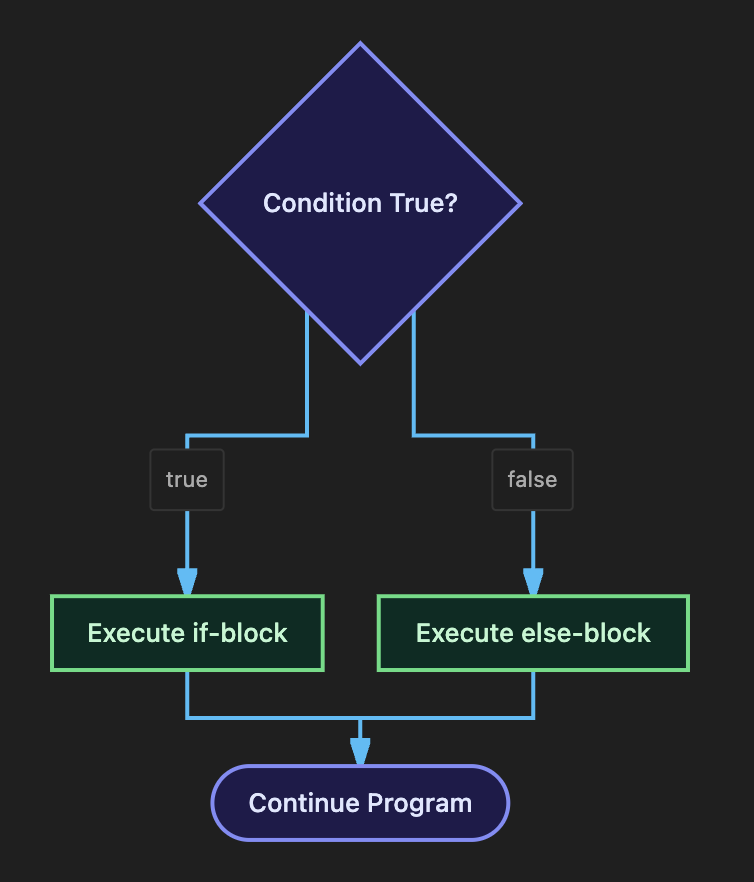
Sometimes, ignoring something isn’t enough; you need a backup plan. That’s where if-else comes in. It gives you an alternative path to take when your condition turns out to be false.
int age = 16;

if (age >= 18) {
    System.out.println("You are eligible to vote.");
} else {
    System.out.println("You are not yet eligible to vote.");
}
The beauty here is that exactly one of these blocks will run. Never both. Never neither.
The else-if Ladder
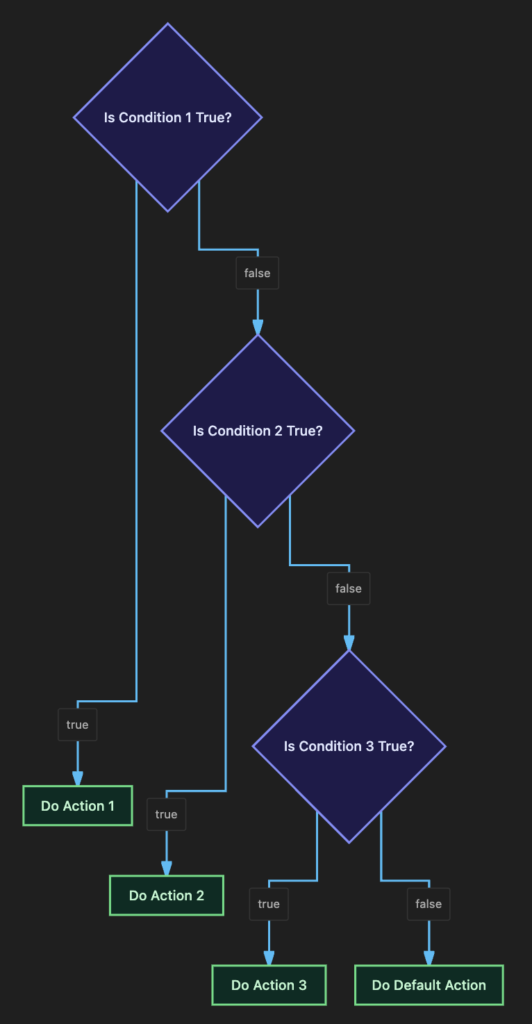
Life is rarely just black and white. When you’re dealing with multiple possible outcomes (like assigning grades based on a test score), you can chain things together using an else-if ladder.
int marks = 78;

if (marks >= 90) {
    System.out.println("Grade: A");
} else if (marks >= 75) {
    System.out.println("Grade: B");
} else if (marks >= 60) {
    System.out.println("Grade: C");
} else {
    System.out.println("Grade: F");
}
Order Matters: Java is pretty lazy (in a good way!). It checks these conditions from top to bottom and stops the exact second it finds one that is true. If we put
marks >= 60at the very top, everyone who passed the test would just get a C!
Nested Conditionals & The Dangling Else
Sometimes, a decision depends on another decision you’ve already made. You can totally put an if statement inside another if statement. We call this nesting.
if (age >= 18) {
    if (hasLicense) {
        System.out.println("You may drive.");
    } else {
        System.out.println("You need a license first.");
    }
} else {
    System.out.println("You are not old enough to drive.");
}
The Notorious “Dangling Else”
Imagine you wrote nested if statements without using those curly braces { }.
if (x > 0)
    if (y > 20)
        System.out.println("Both true");
else
    System.out.println("Wait, whose else is this?");
Even though you indented that else to look like it belongs to the first if, Java’s strict grammar rules will automatically attach it to the nearest preceding unmatched if (the y > 20 one). This causes massive headaches.
Pro Tip: Always, always use curly braces for your if and else blocks, even if it’s just one line of code. It saves you from this exact nightmare.
The switch Statement & Fall-Through
When you find yourself comparing a single variable against a bunch of exact, specific values, an else-if ladder can get a bit clunky. The switch statement is a much cleaner alternative.
int day = 3;

switch (day) {
    case 1:
        System.out.println("Monday");
        break;
    case 2:
        System.out.println("Tuesday");
        break;
    case 3:
        System.out.println("Wednesday");
        break;
    default:
        System.out.println("Invalid day");
}
(Quick note: switch plays nicely with byte, short, char, int, String, and enum. Just don’t try using it with decimals or booleans!)
The Infamous Fall-Through Bug
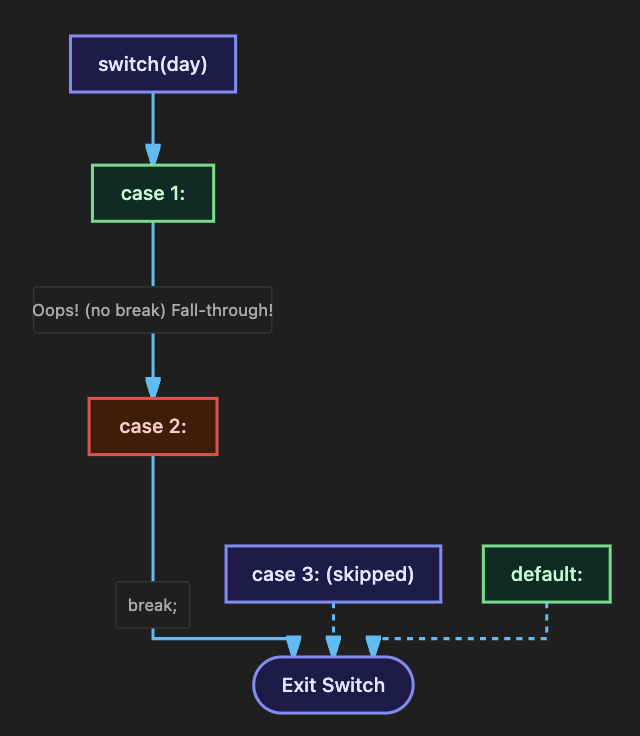
Did you notice those break keywords in the code above? They are crucial. Without a break, Java will execute the matching case and then just keep stubbornly falling down into the next cases below it! This is called “fall-through,” and unless you’re grouping cases together on purpose, it’s usually a bug.
Switch Expressions (A Modern Java Peek)
If you’re using a modern version of Java (13 and up), you actually get access to a brand new, slicker syntax called switch expressions using ->.
String dayName = switch (dayNumber) {
    case 1 -> "Monday";
    case 2 -> "Tuesday";
    default -> "Invalid day";
};
The best part? This totally eliminates the fall-through bug because you don’t even need to use break statements anymore!
The Ternary Operator Revisited
We touched on the ternary operator (?:) back in Part 3. It’s essentially a highly compressed version of a simple if-else statement.
// A quick, clean one-liner
String result = (marks >= 40) ? "Pass" : "Fail";
It’s a fantastic tool, but use it wisely. If you find yourself nesting ternary operators or doing anything overly complex, just use a standard if-else. Your future self (and your teammates) will thank you.
Choosing Between if-else and switch
Still not sure which one to reach for? Here’s a quick cheat sheet:
Reach for if-else when… | Reach for switch when… |
|---|---|
You’re checking ranges (>, <, >=) | You’re checking exact, discrete values |
You have complex logic involving && or || | You’re checking an int, String, or enum |
| You only have 2 or 3 possible paths | You have a ton of branches and want it readable |
Visualizing the Logic
Let’s look at exactly how Java flows through these decisions.
The if-else Flow
The else-if Ladder
The switch Fall-Through Danger
Code Walkthrough: Let’s Build an ATM Validator
Alright, let’s put this all together! We’re going to build a realistic ATM menu that uses a switch statement for the main choices, and a nested else-if ladder to validate the withdrawal rules.
import java.util.Scanner;

public class AtmValidator {
    public static void main(String[] args) {
        Scanner scanner = new Scanner(System.in);
        double accountBalance = 5000.0;

        System.out.println("---- ATM Menu ----");
        System.out.println("1. Check Balance | 2. Withdraw | 3. Exit");
        System.out.print("Choose an option: ");
        int choice = scanner.nextInt();

        switch (choice) {
            case 1:
                System.out.printf("Your balance is: $%.2f%n", accountBalance);
                break;

            case 2:
                System.out.print("Enter amount to withdraw: ");
                double amount = scanner.nextDouble();

                // Here is our else-if ladder doing the heavy lifting!
                if (amount <= 0) {
                    System.out.println("Withdrawal amount must be positive.");
                } else if (amount > accountBalance) {
                    System.out.println("Insufficient balance.");
                } else if (amount % 100 != 0) {
                    System.out.println("Amount must be in multiples of 100.");
                } else {
                    accountBalance -= amount;
                    System.out.printf("Success! New balance: $%.2f%n", accountBalance);
                }
                break;

            case 3:
                System.out.println("Thank you for using the ATM. Goodbye!");
                break;

            default:
                System.out.println("Invalid option selected.");
        }
        scanner.close();
    }
}
How it works:
Using a switch for the main menu (1, 2, 3) keeps the high-level logic perfectly clean and readable. Then, when things get complex inside case 2 (checking balances, enforcing multiples of 100), we seamlessly switch over to an else-if ladder. This is an extremely common, professional pattern you’ll see in the wild all the time.
Common Mistakes Beginners Make
- Putting a semicolon right after your
ifcondition, which creates a useless, empty statement. - Forgetting curly braces on simple
if/elseblocks and running headfirst into the dangling-else trap. - Forgetting to write
breakat the end of yourswitchcases. - Ordering your
else-ifconditions poorly, allowing a broad condition to accidentally “steal” a match meant for a more specific condition lower down.
Best Practices for the Real World
- Order your
else-ifconditions logically—usually from the most specific to the least specific. - Always throw a
defaultcase at the bottom of yourswitchstatements just to handle weird, unexpected inputs gracefully. - Try to avoid nesting your
ifstatements more than two levels deep. If your code is starting to look like a sideways pyramid, consider using&&or||operators to flatten it out.
Performance Considerations
In 99% of cases, the performance difference between an else-if ladder and a switch statement is absolutely negligible. However, if you have a massive amount of discrete cases, the JVM can actually optimize a switch statement under the hood by turning it into a hyper-efficient “jump table.” Still, always prioritize making your code readable before worrying about micro-optimizations!
Frequently Asked Questions
Q1. What happens if none of my switch cases match, and I forgot to write a default case?
Nothing bad! The switch block will just quietly finish up without doing anything, and your program will keep running the code underneath it.
Q2. Can I use a switch statement to check decimal numbers like doubles?
Nope. Java only allows switch to handle byte, short, char, int, String, and enum. Trying to pass in a double or a boolean will throw a nasty compile-time error.
Q3. Is that “fall-through” thing in switch statements always a bug?
Not always. Sometimes developers use it intentionally to group a bunch of cases together that need the exact same response (like grouping December, January, and February into a “Winter” printout). But most of the time? Yeah, it’s because someone forgot a break.
Test Your Knowledge (MCQs)
Q1. What is the output of this code?
int x = 5;
if (x > 10)
    System.out.println("A");
else if (x > 3)
    System.out.println("B");
else
    System.out.println("C");
a) A
b) B
c) C
d) Compile error
Answer: b) B — Java stops at the very first condition that evaluates to true (x > 3).
Q2. Which of these types will cause a compile error if you try to use it in a switch statement?
a) int
b) String
c) double
d) char
Answer: c) double.
Q3. What does the ternary operator return?
a) Nothing — it’s a statement only
b) A value, based on the condition
c) Always a boolean
Answer: b) A value, based on the condition.
Practice Coding Questions
- Write a program using
if-elseto check if a number typed by the user is positive, negative, or zero. - Build a
switchstatement that takes a month number (1-12) and prints out exactly how many days are in that month. - Use nested
ifstatements to figure out if a given year is a leap year. (Hint: It needs to be divisible by 4, but not by 100… unless it’s also divisible by 400). - See if you can rewrite a 3-level deep nested
ifblock using just a singleifstatement packed with&&and||logical operators.
Hands-On Assignment: Traffic Light Simulator
Create a file called TrafficLight.java that does the following:
- Asks the user to type in a traffic light color (
"RED","YELLOW", or"GREEN"). - Uses a
switchstatement to give them the right instruction (“Stop”, “Prepare to stop”, or “Go”). - Make sure to handle invalid colors with a friendly error message!
- Bonus Round: Ask for the user’s current driving speed. If the light is
"YELLOW"and they are driving over 60, use a nested condition to print an aggressive warning to slow down immediately!
Mini Challenge: Classic FizzBuzz
Here’s a legendary interview question for you. Write a program that checks a number from 1 to 100:
- If it’s divisible by both 3 and 5, print “FizzBuzz”
- If it’s only divisible by 3, print “Fizz”
- If it’s only divisible by 5, print “Buzz”
- Otherwise, just print the number itself.
(Hint: Think very carefully about the order of your else-if conditions here!)
Summary of Key Takeaways
ifblocks run code conditionally;if-elsegives you a backup plan; andelse-ifladders let you handle complex, multi-tiered logic.- Order is absolutely critical in an
else-ifladder. - Always use curly braces
{ }to dodge the dangling-else trap. switchstatements are perfect for cleanly checking a single variable against exact, discrete values. Don’t forget yourbreakkeywords!
Your Quick Revision Cheat Sheet
| Structure | When to use it |
|---|---|
if | You just want a single conditional action |
if-else | You have exactly two mutually exclusive paths |
else-if ladder | You are checking ranges or ordered conditions |
Nested if | Your second condition strictly depends on the first |
switch | You have a ton of exact, known values to check against |
Ternary ?: | You need a tiny, single-line decision assignment |
Further Reading
- Oracle Docs — The if-then and if-then-else Statements: Read Docs
- Oracle Docs — The switch Statement: Read Docs
Conclusion
Alright, you made it! Conditional statements are exactly where your programs stop being predictable, boring scripts and start becoming genuinely intelligent. The subtle little traps we talked about today—the dangling else, the switch fall-through, the else-if ordering—are exactly the kinds of details that separate careful senior developers from the pack.
Take a breather, write a little FizzBuzz logic, and I’ll see you in Part 6, where we’ll teach your programs how to automatically loop and repeat logic!
Ready to keep moving? Check out Part 6 — Loops & Iteration!