
Welcome to AlgoVelgo’s ultimate beginner’s guide to Java! Whether you are taking your first steps in programming or transitioning from another language, this guide will lay a rock-solid foundation for your Java journey.
Imagine you spend weeks writing a brilliant piece of software. Now, your company wants to run it on a Windows laptop, a Linux web server, and a Mac used by your testing team—all without changing a single line of code. Sounds like magic, doesn’t it?
This exact challenge is what Java was designed to solve over two decades ago. Before we dive into writing code, it’s crucial to understand why Java exists, how it seamlessly runs on almost any device, and what actually happens under the hood when you run a Java application.
This article is designed to be your definitive starting point. By the end of this guide, you won’t just be able to run a Java program—you will understand the internal mechanics of why it works.
Table of Contents
- Why Java? A Real-World Motivation
- What Is Java?
- The Magic of “Write Once, Run Anywhere”
- JVM vs. JRE vs. JDK: The Golden Trio
- What Exactly is Bytecode?
- Step 1: Installing the JDK
- Step 2: Setting Up Your IDE
- Writing Your First Java Program
- Under the Hood: Code Walkthrough
- Common Mistakes to Avoid
- Best Practices for Beginners
- Top Interview Questions
- Key Takeaways
- Frequently Asked Questions (FAQ)
Why Java? A Real-World Motivation
Let’s rewind to the early 1990s. A team at Sun Microsystems (now part of Oracle), led by James Gosling, was developing software for consumer electronic devices like smart appliances and set-top boxes.
They faced a massive headache: every device had a different hardware processor. Code written in C or C++ had to be specifically recompiled—and sometimes entirely rewritten—for every new piece of hardware. It was a nightmare to maintain.
The team needed a new kind of programming language. They envisioned a language where you could write your code once and run it on any device, regardless of its operating system or processor. That singular goal shaped everything about Java’s architecture.
Today, that same capability is why Java dominates enterprise backend systems, Android applications, banking software, and big data processing.
💡 Tip: When an interviewer asks, “Why is Java platform-independent?” they are looking for you to explain the JVM and bytecode—concepts we’re covering right now!
What Is Java?
Java is a high-level, object-oriented, platform-independent programming language. Let’s break down those technical buzzwords:
| Term | What it Means for You |
|---|---|
| High-level | You write code in easy-to-read English syntax (like int age = 25;) rather than obscure machine instructions. |
| Object-oriented | Code is organized around “objects” that represent real-world entities. This makes complex systems much easier to manage. |
| Class-based | All Java code must live inside a “class.” There is no loose code floating around. |
| Platform-independent | A compiled Java application can run on any system (Windows, Mac, Linux) seamlessly. |
The Magic of “Write Once, Run Anywhere”
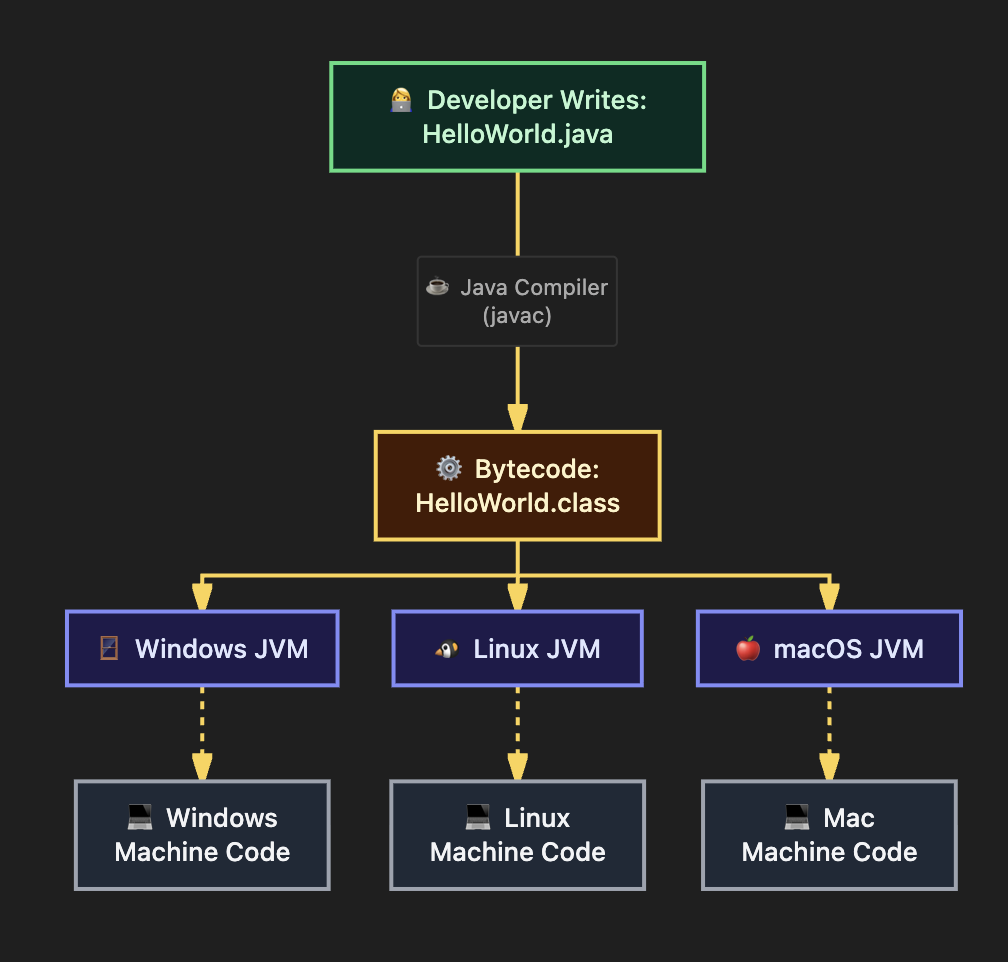
This is Java’s most famous motto. In traditional languages like C, your code is compiled directly into machine code—binary instructions specific to a single processor architecture. If you compile a .exe file on Windows, it simply won’t run on a Mac.
Java revolutionized this process with a clever two-step approach:
- Compilation: The Java compiler translates your human-readable source code into an intermediate format called bytecode.
- Execution: The Java Virtual Machine (JVM) reads this bytecode and translates it into the native machine language of the specific device it’s running on.
Your bytecode is the universal language. It never changes. Instead, every machine has its own custom JVM that understands that universal language.
JVM vs. JRE vs. JDK: The Golden Trio
If there’s one concept that trips up beginners and surfaces in almost every junior Java interview, it’s understanding the difference between the JVM, JRE, and JDK.
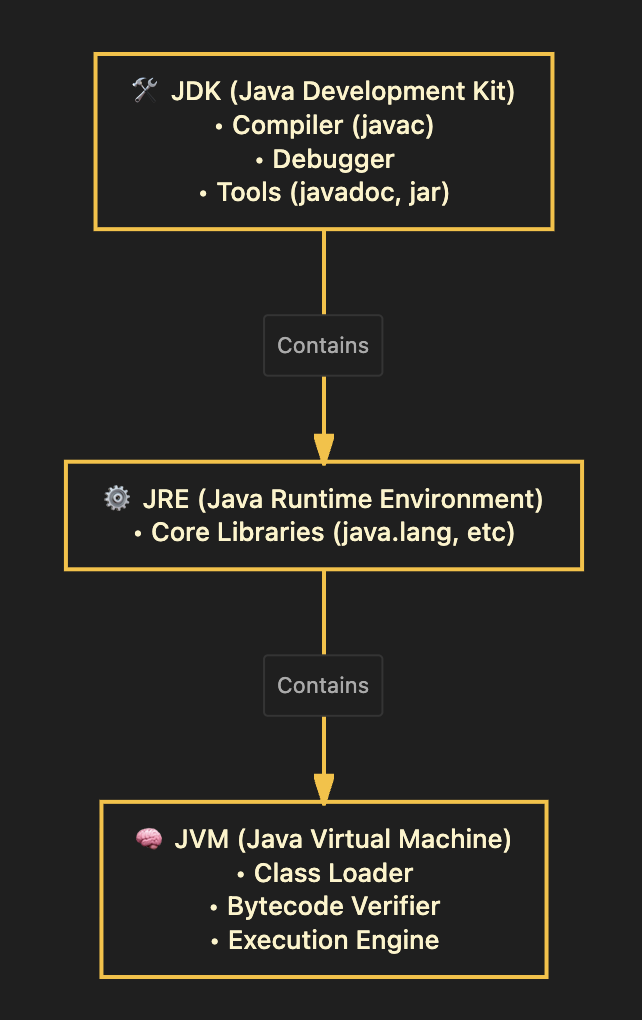
Think of them as nested components, where each larger piece includes the smaller ones:
1. JVM (Java Virtual Machine)
The JVM is the engine that executes your program line by line.
- Platform-Dependent: You download a specific JVM for Windows, a different one for Mac, etc.
- Role: It loads your bytecode, verifies it for security, and translates it into machine code.
2. JRE (Java Runtime Environment)
The JRE is the minimum environment needed to run a Java application.
- Contains: The JVM + core Java libraries.
- Role: If you just want to play a Java game or run an enterprise app, the JRE is all you need.
3. JDK (Java Development Kit)
The JDK is the comprehensive toolkit for software developers.
- Contains: The JRE + development tools like the compiler (
javac) and debugger. - Role: If you want to write and compile Java code, you must install the JDK.
Note: Modern versions of Java (Java 11 and beyond) typically bundle everything into the JDK, so developers no longer need to download the JRE separately.
What Exactly is Bytecode?
Bytecode is the secret sauce of Java’s portability. It’s stored in .class files.
Think of bytecode like a universal translator. It’s not native to Windows, Mac, or Linux. It’s an optimized set of instructions that only the JVM understands. When the JVM reads this bytecode, it translates it into the native machine language on the fly.
Step 1: Installing the JDK
Before you can write Java, you need to install the Java Development Kit (JDK). We recommend an LTS (Long-Term Support) version like Java 17 or Java 21.
Windows Setup
- Download the installer from the Oracle JDK website or grab the open-source Eclipse Temurin build.
- Run the
.msior.exeinstaller. - Open Command Prompt and type:
java -versionandjavac -version. - If it prints the versions, you’re good to go!
macOS Setup
The cleanest way for Mac users is via Homebrew:
brew install openjdk@21Verify the installation in your terminal using java -version.
Linux (Ubuntu/Debian) Setup
Open your terminal and run:
sudo apt update
sudo apt install openjdk-21-jdk
Step 2: Setting Up Your IDE
An Integrated Development Environment (IDE) is a smart text editor that auto-completes code, highlights errors, and makes running programs as simple as clicking a button.
Here are the top two choices for Java developers:
- IntelliJ IDEA (Community Edition): Built specifically for Java. It is heavily recommended for beginners because it requires almost zero manual configuration.
- Visual Studio Code (VS Code): A lightweight editor. To use it for Java, you must install the Extension Pack for Java.
Writing Your First Java Program
Let’s write the legendary “Hello, World!” application.
Create a new file and name it exactly HelloWorld.java. (Note: The capitalization must match exactly!)
// HelloWorld.java
// This is our very first Java program.
public class HelloWorld {
    // The main method — the entry point of every Java application.
    public static void main(String[] args) {

        // Print a message to the console
        System.out.println("Hello, AlgoVelgo Readers!");

    }
}
Compiling and Running via Command Line
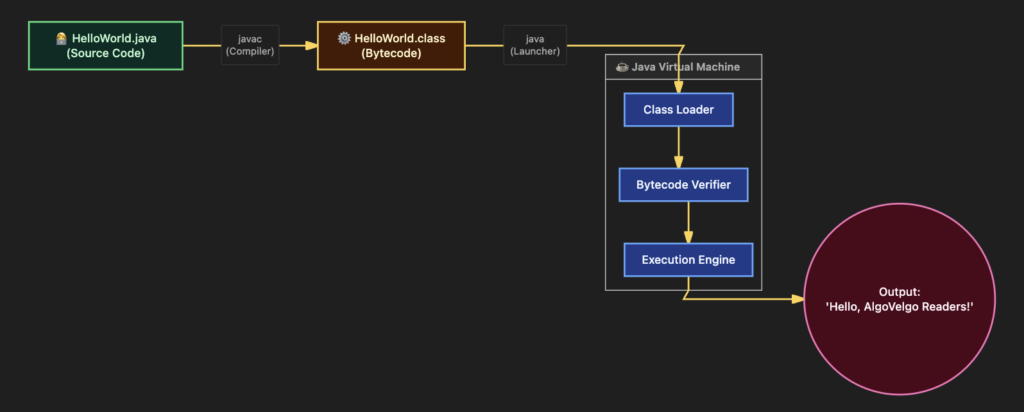
To truly understand Java, you should know how to run it without an IDE’s play button. Open your terminal, navigate to your file’s folder, and run:
1. Compile the code:
javac HelloWorld.java(If successful, it will silently generate a new file named HelloWorld.class)
2. Run the bytecode:
java HelloWorldOutput:
Hello, AlgoVelgo Readers!Visualizing the Execution Pipeline
Here is exactly what happened when you ran those two commands:
Under the Hood: Code Walkthrough
Let’s dissect that code word by word so you aren’t just memorizing syntax.
public: An access modifier meaning this class is visible to the entire system.class: Declares that we are building a new class (a blueprint).HelloWorld: The name of our class.public static void main(String[] args): This exact phrase is the entry point of your application. When the JVM starts your program, it searches specifically for this line to know where to begin.staticmeans the JVM can run this method without having to create an object first.voidmeans this method doesn’t return any data.System.out.println(...): This is a built-in Java command to print text to your console and move to a new line.
Common Mistakes to Avoid
- File Naming Mismatch: Your file name must exactly match your public class name. If the class is
HelloWorld, the file must beHelloWorld.java. - Forgetting Semicolons: In Java, almost every statement must end with a semicolon (
;). Missing one will cause a compilation error. - Running the Wrong Extension: When running your code in the terminal, type
java HelloWorld. Do not typejava HelloWorld.class. - Case Sensitivity: Java is strictly case-sensitive.
Systemis correct;systemwill break your code.
Best Practices for Beginners
- Use PascalCase for Classes: Always capitalize the first letter of every word in a class name (e.g.,
ShoppingCart,UserAccount). - Understand the Terminal: Even if you use an IDE, occasionally compile and run your code from the terminal to maintain a strong mental model of how the JDK works.
- Format Your Code: Keep your curly braces
{ }aligned and indent your code blocks properly. Messy code leads to hard-to-find bugs!
Top Interview Questions
If you’re aiming for a junior developer role, make sure you can answer these confidently:
- What is the difference between JDK, JRE, and JVM?
(Refer back to our Golden Trio section!) - Is Java completely platform-independent?
Answer: The compiled bytecode is platform-independent. However, the JVM itself is platform-dependent (you need a specific JVM for Windows vs. Linux). - Why is the
mainmethod declared as static?
Answer: Because the JVM needs to execute themainmethod to start the program before any objects of the class have been instantiated in memory.
Key Takeaways
- Java was created to adhere to the philosophy of “Write Once, Run Anywhere.”
- You write
.javafiles, the compiler turns them into.class(bytecode) files, and the JVM translates them into machine code. - The JDK is for writing code, the JRE is for running it, and the JVM is the execution engine.
- The entry point to any standard Java application is always
public static void main(String[] args).
Frequently Asked Questions (FAQ)
Q: Do I need to memorize the main method signature?
Yes! public static void main(String[] args) is a strict contract. If you miss a keyword or misspell it, the JVM won’t know how to start your program. Luckily, IDEs like IntelliJ allow you to just type main or psvm and hit “Tab” to auto-generate it.
Q: Is Java free?
Yes. While Oracle offers commercial JDK licenses for large enterprises, you can freely use OpenJDK distributions (like Eclipse Temurin or Amazon Corretto) which are completely free and open-source.
Q: Are Java and JavaScript related?
No! Despite the name, they have entirely different use cases, creators, and philosophies. The name was largely a marketing ploy in the 1990s.
Ready for the next step? Stay tuned to AlgoVelgo’s Java series, where we will dive into Variables, Data Types, and Literals in our next tutorial!