
Welcome back! In our last tutorial, we learned how to build our first Classes and Objects. But there was a problem: every time we created an object, we had to manually set its fields line by line (book.title = "Dune", book.author = "Frank"). Not only is that annoying to type, but it’s dangerous—what if you forget a field? Today, we fix that by introducing Java Constructors: the ultimate tool for building perfect objects from the very first second they exist.

Table of Contents
- Why Do We Need Constructors?
- What Exactly Is a Constructor?
- The “Invisible” Default Constructor
- Parameterized Constructors
- Constructor Overloading
this()Constructor Chaining- The
thisKeyword (Field vs Parameter) - Object Initialization Order
- The No-Argument Constructor Trap
- Code Walkthrough: Bank Account System
- Common Mistakes Beginners Make
- Best Practices
- Frequently Asked Questions (FAQ)
- Interview Prep Questions
- Test Your Knowledge (MCQs)
- Practice Coding Questions
- Hands-On Assignment
- Mini Challenge: Constructor Chain Tracer
- Summary and Cheat Sheet
Why Do We Need Constructors?
Imagine ordering a custom-built laptop online. You don’t receive an empty shell in the mail, followed by a separate processor, RAM, and hard drive that you have to install yourself. Instead, you specify exactly what you want up front, and the laptop arrives fully assembled and ready to use.
In Java, if you create a BankAccount object, it must have an account holder’s name and a starting balance. If you rely on manually setting fields after creation, a tired programmer might forget to set the balance, leaving the account in a dangerously broken state.
Java constructors solve this. They allow you to force the programmer to provide the required data at the exact moment of creation, ensuring the object is always valid.
What Exactly Is a Constructor?
A constructor is a special block of code inside a class that runs automatically once, the moment an object is created using the new keyword.
It looks like a method, but it has two massive differences:
- It must have the exact same name as the class.
- It has no return type (not even
void).
public class Book {

    String title;
    String author;

    // This is a CONSTRUCTOR!
    public Book(String title, String author) {
        this.title = title;
        this.author = author;
    }
}
Now, object creation and initialization happen in one perfect line of code:
Book myBook = new Book("The Hobbit", "J.R.R. Tolkien");The “Invisible” Default Constructor
In our previous tutorial, we didn’t write any constructors, but we still used new Book(). How did that work?
If you don’t write any constructors, Java quietly provides a “Default Constructor” for you behind the scenes. It takes no arguments and simply sets all your fields to their default values (e.g., null for Strings, 0 for numbers).
public class Book {
    String title;
    // Java secretly creates: public Book() {}
}
Parameterized Constructors
A parameterized constructor is one that takes arguments (like our Book example above). It lets you pass in specific starting values.
public class Student {
    String name;
    int rollNumber;

    public Student(String name, int rollNumber) {
        this.name = name;
        this.rollNumber = rollNumber;
    }
}
Now, you literally cannot create a Student without providing a name and a roll number. The compiler will stop you!
Constructor Overloading
Just like methods, Java constructors can be overloaded. You can write multiple constructors in the same class, as long as they have different parameter lists. This gives other developers multiple ways to build your object.
public class Book {
    String title;
    String author;

    // Option 1: Provide everything
    public Book(String title, String author) {
        this.title = title;
        this.author = author;
    }

    // Option 2: Provide only the title, default the author
    public Book(String title) {
        this.title = title;
        this.author = "Unknown";
    }
}
‘this()’ Constructor Chaining
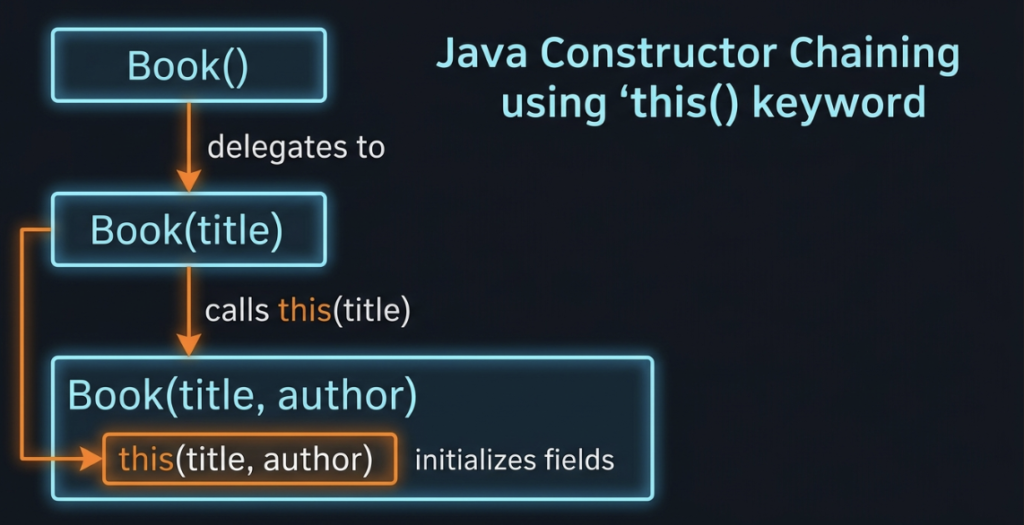
When you overload constructors, you often end up writing the exact same setup code multiple times. To avoid this, Java lets one constructor “call” another constructor using the this() keyword.
public class Book {
    String title;
    String author;

    // The "Master" Constructor
    public Book(String title, String author) {
        this.title = title;
        this.author = author;
    }

    // This constructor chains into the Master constructor!
    public Book(String title) {
        this(title, "Unknown"); // Must be the VERY FIRST line!
    }
}
This is called Constructor Chaining. The Book(String title) constructor simply takes the title, slaps “Unknown” onto it, and hands it off to the Master constructor to do the actual work.
The ‘this’ Keyword (Field vs Parameter)
You’ve seen this.title = title; several times now. Why do we write it that way?
Inside a class, this refers to “the current object”. We use it to resolve a naming clash between a constructor parameter and the class field.
public Book(String title) {
    this.title = title;
    // "This object's field named title" = "The parameter named title"
}
If you just wrote title = title;, Java would get confused and assign the parameter to itself, leaving your actual object field completely blank!
Object Initialization Order
When you type new Book("Dune", "Frank Herbert"), here is the exact micro-second timeline of what Java does:
- Memory Allocation: Space is carved out on the Heap.
- Default Initialization: Fields are temporarily set to
null,0, orfalse. - Constructor Execution: Your constructor code runs, overwriting those defaults.
- Reference Returned: The memory address is handed back to your variable.
The No-Argument Constructor Trap
This is the #1 mistake beginners make with Java constructors.
The moment you write any custom constructor, Java’s invisible default constructor is permanently deleted.
public class Book {
    String title;

    public Book(String title) { // We wrote a parameterized constructor!
        this.title = title;
    }
}
If you now try to write:
Book myBook = new Book(); // ⚠ COMPILE ERROR!It will fail! Because you wrote a custom constructor, Java assumed you wanted total control. If you still want to allow creating an empty object, you must manually write the empty constructor yourself:
public Book() {
    this.title = "Untitled";
}
Code Walkthrough: Bank Account System
Let’s look at a beautiful, production-ready class that uses constructor overloading and this() chaining perfectly.
class BankAccount {
    String holderName;
    String accountNumber;
    double balance;

    // Constructor 1: The Master Constructor
    public BankAccount(String holderName, String accountNumber, double balance) {
        this.holderName = holderName;
        this.accountNumber = accountNumber;
        this.balance = balance;
        System.out.println("Account created for " + holderName);
    }

    // Constructor 2: Overloaded (Defaults balance to zero)
    public BankAccount(String holderName, String accountNumber) {
        this(holderName, accountNumber, 0.0); // Chains to Constructor 1
    }

    // Constructor 3: Overloaded (No arguments provided!)
    public BankAccount() {
        this("Unassigned", "PENDING-000"); // Chains to Constructor 2, which chains to 1!
    }

    void displayDetails() {
        System.out.println("Holder: " + holderName + " | Balance: $" + balance);
    }
}

public class BankAccountDemo {
    public static void main(String[] args) {
        BankAccount acc1 = new BankAccount("Ananya", "SAV-101", 5000);
        BankAccount acc2 = new BankAccount("Rohan", "SAV-102");
        BankAccount acc3 = new BankAccount();

        acc1.displayDetails();
        acc2.displayDetails();
        acc3.displayDetails();
    }
}
Common Mistakes Beginners Make
- Giving a constructor a return type. If you write
public void Book(), you just accidentally created a normal method named “Book”. It is no longer a constructor! - Putting code before
this(). Thethis()call must be the absolute very first line inside a constructor. - Forgetting
this.. Writingname = name;does absolutely nothing. Always usethis.name = name;.
Best Practices
- Always provide a constructor if your object requires specific data to function properly.
- Use
this()chaining to funnel all initialization logic into one “Master” constructor. - Stop and ask: “Do I still need a no-argument constructor?” If you added parameterized ones, remember to explicitly add the no-arg one back if users expect it!
Frequently Asked Questions (FAQ)
Q1. What is the difference between a constructor and a regular method?
A constructor has no return type and exactly matches the class name. It only runs once, automatically, when the object is created.
Q2. What happens if I forget to initialize a field in a constructor?
Java will quietly leave it at its default value (like 0 or null). It won’t crash immediately, but it might cause a NullPointerException later!
Interview Prep Questions
Basic:
- What is a constructor?
- What is the default constructor?
Intermediate:
- What happens to the default constructor when you write a parameterized one?
- Explain how
this()chaining works.
Advanced:
- Why must
this()be the very first line in a constructor?
Test Your Knowledge (MCQs)
Q1. Which of the following is a valid constructor for a class named Car?
a) void Car() { }
b) Car() { }
c) public int Car() { return 0; }
Answer: b) No return type, name matches exactly!
Q2. What is the purpose of writing this.title = title;?
a) To call another constructor.
b) To distinguish the class field from the method parameter.
Answer: b) It prevents ambiguity.
Practice Coding Questions
- Create a
Movieclass with fieldstitleandrating. Write a Master constructor, and an overloaded constructor that defaults the rating to0.0. - Write a class, create a constructor, and deliberately put a
System.out.println()before athis()call. Observe the compile error.
Hands-On Assignment: Employee System
- Build an
Employeeclass withname,id, andsalary. - Write a fully-parameterized Master constructor.
- Write a two-argument constructor (
nameandid) that usesthis()to default the salary to$40,000. - Create objects using both constructors and print their details!
Mini Challenge: Constructor Chain Tracer
Write a class with four overloaded constructors (no-arg, 1-arg, 2-arg, 3-arg) chained together using this().
After the this() call in each constructor, add a System.out.println("X-arg constructor called");.
Run the no-arg constructor. Look closely at the order the messages print in the console. Why do they print in reverse order? (Hint: It’s just like recursion unwinding!)
Summary and Cheat Sheet
- Constructors guarantee your objects are built correctly from the moment they are created.
- They have no return type and the same name as the class.
- Writing a custom constructor deletes Java’s invisible default constructor.
- You can overload constructors and use
this()to chain them together, avoiding duplicate code.
Constructor Cheat Sheet
| Feature | Rule |
|---|---|
| Name | Exactly matches class name. |
| Return Type | None (Not even void). |
| Overloading | Allowed! (Different parameters). |
this.field | Resolves naming clashes with parameters. |
this() | Calls another constructor; must be the 1st line. |
Further Reading
- Official Oracle Docs: Java Constructors
Conclusion
By mastering Java constructors, you’ve taken total control over how your objects are brought into existence. You are no longer relying on hope and manual variable assignments.
But notice how we keep using the this keyword? It turns out this is one of the most important concepts in Object-Oriented Programming, and it helps us understand the massive divide between things that belong to an Object versus things that belong to the Class.
Ready to finally understand what the word static actually means? Check out Part 15 — The this Keyword & Static Members!