
Hey everyone! Welcome back. In our last tutorial, we learned how to use loops to repeat tasks effortlessly. But there was a missing piece to the puzzle. So far, every variable we’ve created could only hold one single value at a time. What happens when you need to store the exam scores of 40 students? Or the prices of 10,000 products? Writing 10,000 separate variables would be a nightmare! Today, we solve that problem. We are going to learn about Java Arrays—the foundation for storing, organizing, and searching massive collections of data.
Table of Contents
- Why Do We Need Arrays?
- What Exactly Is an Array?
- Declaring and Initializing Arrays
- Accessing and Modifying Elements
- The Magic
lengthProperty - Iterating Over Arrays with Loops
- Default Values in Arrays
- Classic Algorithms: Sum, Max, Min
- Finding Data: Linear Search
- The Dreaded
ArrayIndexOutOfBoundsException - Surprise: Arrays Are Actually Objects!
- Visualizing Memory & Search
- Code Walkthrough: Student Marks Analyzer
- Common Mistakes Beginners Make
- Best Practices in the Real World
- Performance Considerations
- Frequently Asked Questions (FAQ)
- Interview Prep Questions
- Test Your Knowledge (MCQs)
- Practice Coding Questions
- Hands-On Assignment
- Mini Challenge: Duplicate Detector
- Summary and Cheat Sheet
Why Do We Need Arrays?
Think about a weather monitoring station. It records the temperature every single hour for a full day. That’s 24 readings.
If we didn’t have arrays, you’d have to write something like this:
int temp1 = 22;
int temp2 = 24;
int temp3 = 21;
// ... and so on for 24 lines!
And what if you wanted to find the average? You couldn’t use a loop! You’d have to manually type out (temp1 + temp2 + temp3... ) / 24. It’s a complete mess.
What you actually want is one single variable that represents a collection of all 24 readings, which you can easily loop through. That is exactly what Java Arrays do. They let you store, aggregate, and search massive collections of data with just a few lines of code.
What Exactly Is an Array?
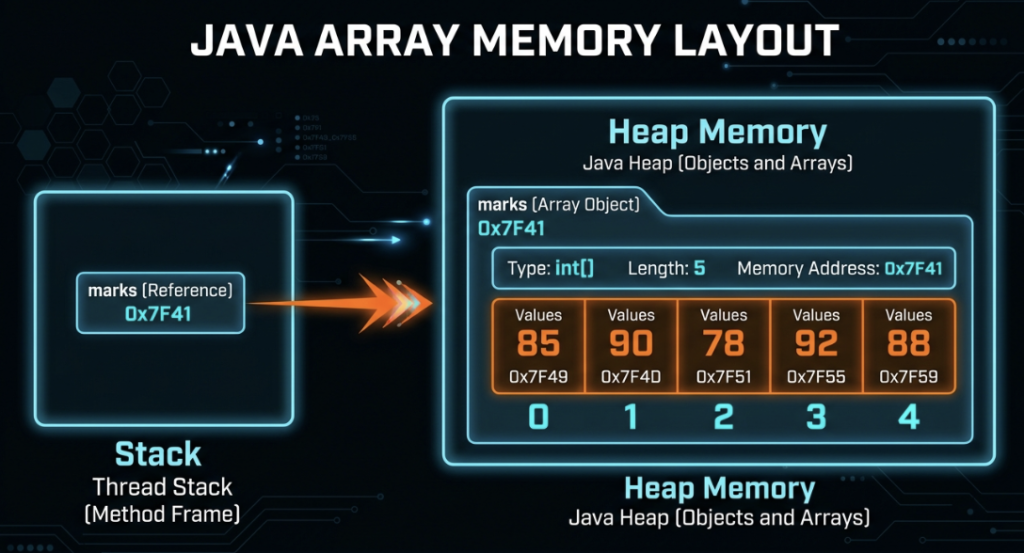
An array is a fixed-size container that holds multiple values of the exact same type (like a bunch of integers, or a bunch of Strings). They are stored right next to each other in your computer’s memory, and you access them using a numbered index.
Here are the golden rules of arrays:
- Fixed Size: Once you create an array, its size is locked. You can’t magically make it bigger later.
- Same Type: You can’t mix numbers and text in a standard array.
- Zero-Indexed: The very first item is at index
0. Not1. This trips everyone up at first! - Ordered: The elements stay in the exact position you put them in.
Declaring and Initializing Arrays
There are a few ways to bring an array to life in Java.
Method 1: Declare, then Create, then Assign
int[] marks;              // Hey Java, I'm going to make an array of ints!
marks = new int[5];       // Make room for exactly 5 of them.
marks[0] = 85;            // Put 85 in the very first slot.
marks[1] = 90;
marks[2] = 78;
marks[3] = 92;
marks[4] = 88;
Method 2: The One-Liner (Declare and Create)
int[] marks = new int[5]; // Creates an array of 5 ints, all defaulting to 0Method 3: The Array Literal (The fastest way!)
If you already know exactly what numbers you want to put in, just use curly braces!
int[] marks = {85, 90, 78, 92, 88}; // Java is smart enough to know the size is 5Common Mistake: The curly brace trick
{...}only works on the exact same line where you declare the variable. You can’t declareint[] marks;on line 1, and then saymarks = {1, 2, 3};on line 2. Java will yell at you.
Accessing and Modifying Elements
To grab a value out of an array (or change it), just use its index number in square brackets.
int[] marks = {85, 90, 78, 92, 88};

// Reading values
System.out.println(marks[0]); // Prints 85 — the FIRST element!
System.out.println(marks[4]); // Prints 88 — the LAST element!

// Modifying a value
marks[2] = 100;
System.out.println(marks[2]); // Now it prints 100!
Pro Tip: Since we start counting at 0, the last valid index of an array is always its size minus one. If an array has 5 items, the last item is at index 4!
The Magic ‘length’ Property
Every array in Java has a built-in property called length that tells you exactly how big it is.
int[] marks = {85, 90, 78, 92, 88};
System.out.println(marks.length); // Prints 5
Gotcha Alert: Notice there are NO parentheses after
length. It’smarks.length, notmarks.length(). This is different from how you check the length of aString, and it confuses beginners all the time.
Iterating Over Arrays with Loops
Arrays and loops go together like coffee and coding. Let’s look at the two best ways to loop through an array.
1. The Traditional for Loop
int[] marks = {85, 90, 78, 92, 88};

for (int i = 0; i < marks.length; i++) {
    System.out.println("Index " + i + ": " + marks[i]);
}
Notice how we used i < marks.length instead of hardcoding a 5? That is a crucial habit to build. If we add more students to the array later, our loop automatically adapts!
2. The Enhanced for Loop (The “For-Each” Loop)
for (int mark : marks) {
    System.out.println(mark);
}
This reads just like plain English: “For each mark in the marks array, print it out.” It is super clean and completely eliminates the risk of messing up your index numbers.
However, there is a catch: You can’t use a for-each loop if you need to actually change the values inside the array, or if you need to know the index number. If you just need to read the data, use for-each. If you need to modify data, stick to the traditional loop.
Default Values in Arrays
What happens if you make a massive array, but you don’t actually put any numbers into it yet? Java’s got your back. It automatically fills empty arrays with default values.
| Array Type | Default Value |
|---|---|
int, short, byte, long | 0 |
double, float | 0.0 |
char | '\u0000' (a blank, null character) |
boolean | false |
Objects (like String) | null |
int[] numbers = new int[3];
System.out.println(numbers[0]); // Prints 0!

String[] names = new String[3];
System.out.println(names[0]); // Prints null!
Classic Algorithms: Sum, Max, Min
These three little algorithms are the bread and butter of programming. You will see these patterns pop up in interviews, exams, and real-world apps constantly.
1. Sum of All Elements
int[] numbers = {12, 45, 7, 23, 56, 3};
int sum = 0;

for (int num : numbers) {
    sum += num;
}
System.out.println("Sum: " + sum); // 146
2. Finding the Maximum
The trick here is to just assume the very first number is the biggest. Then, compare it to every other number. If you find one that’s bigger, update your assumption!
int[] numbers = {12, 45, 7, 23, 56, 3};
int max = numbers[0]; // Start by assuming the first guy is the biggest

for (int i = 1; i < numbers.length; i++) {
    if (numbers[i] > max) {
        max = numbers[i]; // Found a bigger one!
    }
}
System.out.println("Maximum: " + max); // 56
3. Finding the Minimum
Same exact logic, just flip the greater-than sign!
int[] numbers = {12, 45, 7, 23, 56, 3};
int min = numbers[0];

for (int i = 1; i < numbers.length; i++) {
    if (numbers[i] < min) {
        min = numbers[i]; // Found a smaller one!
    }
}
System.out.println("Minimum: " + min); // 3
Finding Data: Linear Search
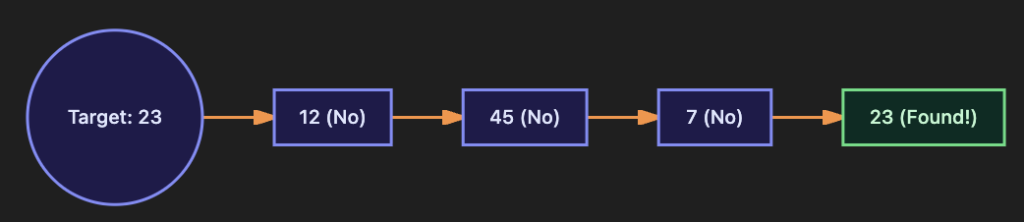
What if you need to find out if the number 23 is in our array? We use a Linear Search. This simply means we start at the beginning and check every single item one by one until we find it.
int[] numbers = {12, 45, 7, 23, 56, 3};
int target = 23;
int foundIndex = -1; // -1 is universally used to mean "we haven't found it yet"

for (int i = 0; i < numbers.length; i++) {
    if (numbers[i] == target) {
        foundIndex = i;
        break; // We found it! Hit the brakes so we don't keep searching uselessly.
    }
}

if (foundIndex != -1) {
    System.out.println("Found " + target + " at index " + foundIndex);
} else {
    System.out.println(target + " was not found.");
}
Interview Tip: An interviewer might ask, “Can we make this search faster?” The honest truth is, for a random, unsorted array, no. You have to check every item. But if the array was sorted in numerical order, we could use a blazing-fast technique called Binary Search. We’ll get to that later, but it’s great to know that sorted data unlocks huge speed boosts!
The Dreaded ‘ArrayIndexOutOfBoundsException’
This is a rite of passage. You will see this error. It happens when you try to access a slot in your array that simply doesn’t exist.
int[] numbers = {10, 20, 30}; // Valid indices are 0, 1, and 2

System.out.println(numbers[3]); // CRASH!
If you do this, Java panics and throws an ArrayIndexOutOfBoundsException. The most common way this happens is the classic “off-by-one” bug in a for loop, where you accidentally use <= instead of <.
// BUG: using <= means 'i' will eventually equal 3, crashing the program!
for (int i = 0; i <= numbers.length; i++) {
    System.out.println(numbers[i]);
}
Surprise: Arrays Are Actually Objects!
Even though we’re filling them with simple primitive numbers like ints, the array itself is actually a reference object in Java. Why does that matter? Look at this:
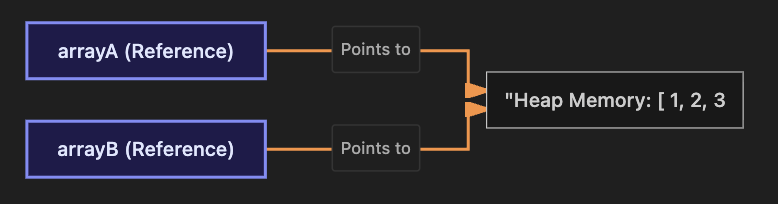
int[] arrayA = {1, 2, 3};
int[] arrayB = arrayA;

arrayB[0] = 99;

System.out.println(arrayA[0]); // Prints 99!
Wait, what? We changed arrayB, but arrayA changed too?
Yep! Saying arrayB = arrayA does not make a copy of the array. It just creates a second remote control (arrayB) that points to the exact same TV (arrayA) in your computer’s memory. If you want a genuine, independent copy, you have to manually copy the numbers over one by one using a loop, or use a helper method.
Visualizing Memory & Search
Let’s look at exactly how Java structures arrays in memory and how a linear search works.
How Java Arrays Look in Memory
Aliasing: Two References, One Array
Linear Search Visualization
Code Walkthrough: Student Marks Analyzer
Let’s pull everything together into a real, functional program that asks a teacher for their students’ grades, stores them in an array, and calculates all the stats for them automatically!
import java.util.Scanner;

public class StudentMarksAnalyzer {

    public static void main(String[] args) {

        Scanner scanner = new Scanner(System.in);

        System.out.print("How many students are in the class? ");
        int numberOfStudents = scanner.nextInt();

        // 1. Create an array dynamically based on what the teacher typed!
        int[] marks = new int[numberOfStudents];

        // 2. Loop to let the teacher input the grades
        for (int i = 0; i < marks.length; i++) {
            System.out.print("Enter marks for student " + (i + 1) + ": ");
            marks[i] = scanner.nextInt();
        }

        // 3. Let's calculate the sum and average
        int sum = 0;
        for (int mark : marks) {
            sum += mark;
        }
        // Remember to cast to double so we don't lose the decimal places!
        double average = (double) sum / marks.length;

        // 4. Find the absolute highest and lowest grades in the class
        int max = marks[0];
        int min = marks[0];
        int maxIndex = 0;
        int minIndex = 0;

        for (int i = 1; i < marks.length; i++) {
            if (marks[i] > max) {
                max = marks[i];
                maxIndex = i; // Save the index so we know WHICH student got the high score
            }
            if (marks[i] < min) {
                min = marks[i];
                minIndex = i;
            }
        }

        // 5. Print a beautiful report
        System.out.println("\n---- Class Report ----");
        System.out.printf("Total students : %d%n", marks.length);
        System.out.printf("Sum of marks   : %d%n", sum);
        System.out.printf("Average marks  : %.2f%n", average);

        // We add +1 to the index so it says "Student 1" instead of "Student 0"
        System.out.printf("Highest marks  : %d (Student %d)%n", max, maxIndex + 1);
        System.out.printf("Lowest marks   : %d (Student %d)%n", min, minIndex + 1);

        scanner.close();
    }
}
Why this code is awesome: Notice how we used new int[numberOfStudents]? We let the teacher decide how big the array needed to be while the program was running! We also saved the maxIndex and minIndex so we could easily translate our nerdy zero-based index back into a human-friendly “Student 1” format for the final printout.
Common Mistakes Beginners Make
- Using
<=instead of<in aforloop, crashing your program with anArrayIndexOutOfBoundsException. - Writing
array.length()with parentheses. It is justarray.length. - Forgetting that array indices start at
0. If you have 10 items, the last index is 9! - Hardcoding a
0as your starting guess for amaxorminalgorithm. Always usemarks[0]instead, just in case all the numbers in the array happen to be negative!
Best Practices in the Real World
- Always use
array.lengthin your loops instead of hardcoding numbers like5or10. Your code becomes flexible and bulletproof. - Use the
for-eachloop if you’re just reading data. It’s so much cleaner to read. - Throw a
breakin your search loops once you find what you’re looking for. There’s no reason to keep searching if you already have the answer! - Give your arrays plural names! Use
studentMarksorprices, not justarr.
Performance Considerations
Reading a value from an array using its index (array[5]) is what computer scientists call an O(1) operation. It happens in constant time. It is literally one of the absolute fastest operations your computer can perform.
However, things like Sum, Max, and Linear Search are O(n) operations. That means if your array doubles in size, the time it takes to search it also doubles. For small arrays, this is totally fine. But if you have an array with 10 million items and you need to search it constantly, you’re going to want to use a faster data structure (which we will cover later in the course!).
Frequently Asked Questions (FAQ)
Q1. I made my array size 5, but now I need it to be 6. Can I change it?
Nope! Standard arrays are totally fixed in size. If you want an array that automatically grows and shrinks, you’ll want to use an ArrayList (we’ll learn about those in Part 31).
Q2. What happens if I try to look up array[-1]?
Your program will instantly crash with an ArrayIndexOutOfBoundsException. Negative indices do not exist in Java arrays (unlike some other languages like Python).
Q3. Why did arrayB = arrayA not make a copy of my array?
Because arrays are reference objects! You didn’t copy the data; you just made a second variable that points to the exact same pile of data in memory.
Q4. What is the difference between Linear Search and Binary Search?
Linear search checks every single item one by one, from start to finish. It works on any array. Binary search is incredibly fast, but it only works if the array has already been sorted in numerical/alphabetical order.
Interview Prep Questions
Basic:
- What is an array, and what are its key limitations in Java?
- If an array has
nelements, what is the index of the first and last element? - What is the default value of an empty
int[]array? What about aString[]array?
Intermediate:
- Why does an
ArrayIndexOutOfBoundsExceptionhappen, and how do you prevent it? - Explain why typing
int[] b = a;doesn’t actually copy the contents of arraya. - When should you use an enhanced
for-eachloop over a traditionalforloop?
Advanced:
- What is the time complexity (Big O notation) of a Linear Search? When would you use a faster alternative?
- Why can’t you use an enhanced
for-eachloop to modify the values inside an array?
Test Your Knowledge (MCQs)
Q1. What is the valid index range for an array of length 6?
a) 1 to 6
b) 0 to 6
c) 0 to 5
d) 1 to 5
Answer: c) 0 to 5.
Q2. What is the output of this code?
int[] arr = {4, 8, 15, 16, 23, 42};
System.out.println(arr.length);
a) 5
b) 6
c) Compile error
d) 42
Answer: b) 6. (Remember, length is 6, but the highest index is 5!)
Q3. What does this code do?
int[] a = {1, 2, 3};
int[] b = a;
b[0] = 100;
System.out.println(a[0]);
a) Prints 1
b) Prints 100
c) Compile error
Answer: b) 100. Because a and b reference the exact same underlying array in memory.
Q4. What is the default value of a newly created boolean[] array?
a) true
b) null
c) false
d) 0
Answer: c) false.
Practice Coding Questions
- Create an array of 6 integers and print them out backwards using a traditional
forloop. - Write a loop that counts how many numbers in your array are greater than
50. - Try to reverse an array in place (without creating a second array) by swapping the first item with the last item, the second with the second-to-last, etc.
- See if you can find the second-largest number in an array without sorting it first!
- Write a Linear Search that doesn’t just stop at the first match, but counts how many total times a target number appears in the array.
Hands-On Assignment: Monthly Expense Tracker
Create a file named ExpenseTracker.java. Give this a shot:
- Ask the user how many expenses they want to log this month. Create an array of exactly that size.
- Loop through and ask them to type in the dollar amount for each expense (use
double!). - Loop through the array to calculate and print out: the total spent, the average expense, the highest single expense, and the lowest single expense.
- Ask them for their “budget limit”, and count how many individual expenses blew past that limit.
- Make it look professional! Use
printfto format all the money to exactly 2 decimal places.
Mini Challenge: The Duplicate Detector
Write a program that takes a hardcoded array of 8 integers (make sure you put a few duplicates in there on purpose).
Use nested loops to check every single number against every other number to detect duplicates! See if you can print out the duplicates, but make sure you only print them once, even if they appear three or four times. (This is trickier than it sounds, and it’s a fantastic brain workout!)
Summary and Cheat Sheet
- Arrays hold multiple items of the exact same type in a fixed-size container.
- They are zero-indexed. If an array’s length is
n, the valid slots are0throughn - 1. - Accessing
array.length(no parentheses!) gives you the size. - Use a traditional
forloop to edit data, and the slickfor-eachloop to just read data. - Sum, Max, Min, and Linear Search are your foundational algorithms. Memorize these patterns.
- Arrays are Reference Objects. Making
b = ajust points two variables at the exact same data.
Your Quick Array Cheat Sheet
| Operation | Java Syntax |
|---|---|
| Declare + Create | int[] arr = new int[5]; |
| Declare + Initialize | int[] arr = {1, 2, 3}; |
| Access an element | arr[i] |
| Change an element | arr[i] = 99; |
| Get the size | arr.length (No parentheses!) |
| The read-only loop | for (int x : arr) |
Further Reading
- Want to read the official Oracle docs? Check out Oracle Java Tutorials — Arrays
- Dive deeper into the Java Language Spec: Java Array Types
Conclusion
You’ve just unlocked a massive milestone in your programming journey. Arrays are the first true “Data Structure” you’ll learn, and they completely change what you can build. Without them, analyzing data, building inventories, or tracking user stats is basically impossible.
Take your time with the Sum, Max, and Search exercises. You will use those exact thought patterns for the rest of your career. Once you feel comfortable, grab a coffee and meet me in Part 8, where we are going to fold arrays into the second dimension with Multi-Dimensional Arrays!
Ready to tackle grids and matrices? Check out Part 8 — Multi-Dimensional Arrays!