
Hey there! Welcome back to our Java series. In our last tutorial, we gave your programs a brain by introducing conditional statements. Today, we’re giving them some serious muscle. Imagine having to do the exact same repetitive task a thousand times by hand—exhausting, right? That’s where Java loops and iteration come in. We are going to teach your code how to repeat tasks effortlessly, process massive amounts of data, and run tirelessly until the job is done.
Table of Contents
- Why Do We Even Need Loops?
- The trusty
forLoop - The flexible
whileLoop - The stubborn
do-whileLoop - Cheat Sheet: Choosing the Right Loop
- Taking Control:
breakandcontinue - Nested Loops (Loops inside Loops!)
- Infinite Loops & Off-By-One Errors
- Visualizing Loop Flows
- Code Walkthrough: Number Guessing Game
- Common Mistakes Beginners Make
- Best Practices in the Real World
- Performance Considerations
- Frequently Asked Questions (FAQ)
- Interview Prep Questions
- Test Your Knowledge (MCQs)
- Practice Coding Questions
- Hands-On Assignment
- Mini Challenge: The Prime Checker
- Summary and Cheat Sheet
Why Do We Even Need Loops?
Let’s say your boss asks you to print the numbers 1 to 100 on the screen. Without loops, you’d be stuck writing System.out.println exactly one hundred times. It’s tedious, error-prone, and a total nightmare to maintain. What if tomorrow they change their mind and want 1 to 10,000?
Loops completely solve this. They allow you to write the logic for a repetitive action just once, and then tell Java exactly how many times (or under what conditions) it should repeat that logic.
Whether you’re building a retail inventory system that needs to check thousands of items, retrying a failed network connection, or printing out a receipt for a customer, Java loops and iteration are what make it possible. Let’s break down the three main tools you have: for, while, and do-while.
The trusty ‘for’ Loop
When you know exactly how many times you want to repeat something (or if you can easily calculate it), the for loop is your best friend.
for (int i = 1; i <= 5; i++) {
    System.out.println("Iteration: " + i);
}
If you run this, you’ll see it prints out Iteration 1 through 5, neat and tidy.
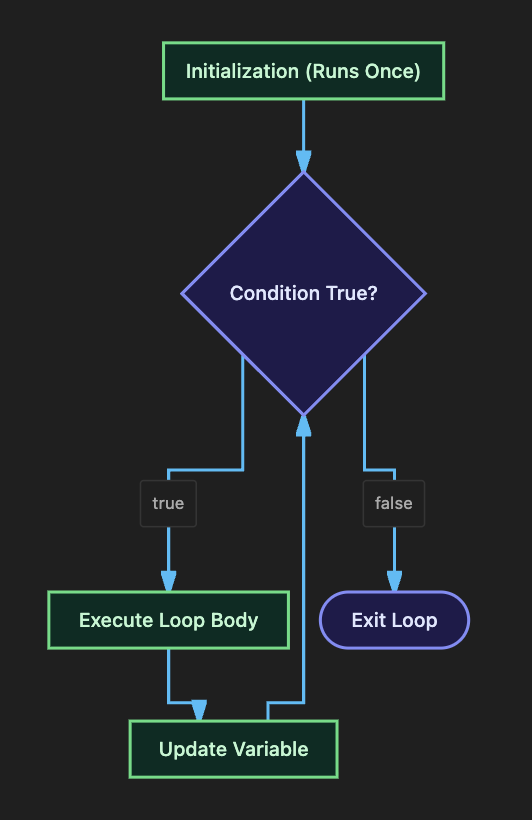
How it actually works under the hood:
- Initialization (
int i = 1): This runs exactly once before the loop even starts. It sets up our starting counter. - Condition (
i <= 5): Java checks this before every single loop. If it’s true, the loop runs. If it’s false, the loop instantly stops. - Update (
i++): This runs after the code inside the loop finishes, bumping our counter up by 1 before checking the condition again.
Scope Check: That variable
ionly exists inside the loop. If you try to printiafter the closing}, Java will throw an error!
And yes, you can count backward too! Just change it to for (int i = 10; i >= 1; i--).
The flexible ‘while’ Loop
Sometimes, you don’t know exactly how many times you need to loop. You just want the code to keep repeating as long as a certain condition remains true. That’s where the while loop shines.
int count = 1;

while (count <= 5) {
    System.out.println("Count is: " + count);
    count++;  // Crucial! Without this, the loop runs forever!
}
Notice that the condition is checked before the loop runs. If count started at 10, the loop body would never execute, not even once.
A Real-World Example: Retry Logic
Imagine you’re trying to connect to a database over a spotty wifi connection. You don’t know exactly which attempt will work, but you want to try up to 3 times before giving up.
boolean connectionSuccessful = false;
int attempts = 0;

while (!connectionSuccessful && attempts < 3) {
    attempts++;
    System.out.println("Attempting connection... try #" + attempts);

    // Simulating a successful connection on the 3rd try
    connectionSuccessful = (attempts == 3);
}
This is a beautiful, professional pattern. It loops until success, or until you hit a hard limit.
The stubborn ‘do-while’ Loop
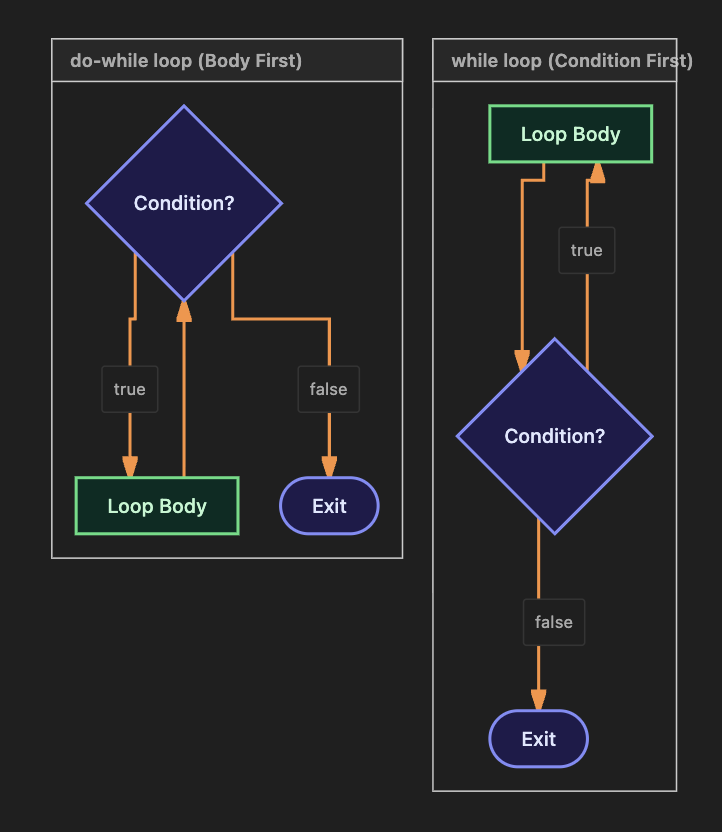
The do-while loop is the while loop’s slightly more aggressive sibling. It does the exact same thing, but with one massive difference: it checks the condition at the END of the loop, not the beginning.
This guarantees that the code inside the loop will run at least one time, no matter what.
int number;
Scanner scanner = new Scanner(System.in);

do {
    System.out.print("Enter a number greater than 0: ");
    number = scanner.nextInt();
} while (number <= 0); // Note the semicolon here!

System.out.println("Thank you! You entered: " + number);
Think about it: you have to ask the user for a number at least once before you can check if they followed the rules. This makes do-while the absolute king of menu systems and input validation.
Cheat Sheet: Choosing the Right Loop
Honestly, any for loop can be rewritten as a while loop and vice-versa. But picking the right one makes your code infinitely easier for other humans to read.
| Scenario | Best Choice |
|---|---|
| You know exactly how many iterations you need | for loop |
| You don’t know how many; it depends on a condition | while loop |
| The code absolutely must run at least once | do-while loop |
Taking Control: `break` and `continue`
Sometimes you need to pull the emergency brake or skip a step.
breakimmediately kills the entire loop. Boom, done.continueskips the rest of the current iteration and jumps straight back to the top to start the next one.
Using break (The Early Exit):
for (int i = 1; i <= 10; i++) {
    if (i == 6) {
        break; // Stops the loop dead in its tracks when i hits 6
    }
    System.out.println(i);
}
// This will only print 1, 2, 3, 4, 5.
Using continue (The Skipper):
for (int i = 1; i <= 10; i++) {
    if (i % 2 == 0) {
        continue; // Skips all the even numbers!
    }
    System.out.println(i);
}
// This will print 1, 3, 5, 7, 9.
Nested Loops (Loops inside Loops!)
Just like nested if statements, you can put a loop inside another loop. This is your go-to move anytime you need to process grids, coordinates, or tables.
for (int row = 1; row <= 3; row++) {
    for (int col = 1; col <= 3; col++) {
        System.out.print(row + "," + col + "  ");
    }
    System.out.println(); // Moves to a new line after the inner loop finishes a row
}
Here is the secret to nested loops: For every single tick of the outer loop, the inner loop runs completely from start to finish. If the outer loop runs 3 times, and the inner loop runs 3 times, the code inside executes a total of 9 times (3 x 3).
Common Mistake: Never use the exact same variable name (like
i) for both the inner and outer loops. Always use distinct names likerowandcol, oriandj.
Infinite Loops & Off-By-One Errors
The Accidental Infinite Loop (Whoops!)
If you forget to update your counter in a while loop, it will run forever until your computer begs for mercy.
int i = 1;
while (i <= 5) {
    System.out.println(i);
    // We forgot to write i++ here! It will print "1" forever.
}
The Intentional Infinite Loop (A Pro Move)
Sometimes, running forever is exactly what you want! If you’re building a web server or a video game, the program needs to run continuously until someone explicitly tells it to stop.
while (true) {
    System.out.print("Type 'exit' to quit: ");
    String command = scanner.nextLine();

    if (command.equals("exit")) {
        break; // This is our escape hatch!
    }
}
This is a totally valid and common design pattern, as long as you provide a reachable break statement inside to act as an escape hatch.
Off-By-One Errors
This is when your loop runs one time too many, or one time too few. It usually happens because you confused < with <=.
// Trying to print 1 through 5:
for (int i = 1; i < 5; i++) {
    System.out.println(i); // This only prints 1, 2, 3, 4! We missed 5!
}
Always trace the very first and very last iteration of your loops in your head to make sure your boundaries are correct.
Visualizing Loop Flows
Let’s look at exactly how the JVM navigates these loops.
The for Loop Flow
while vs do-while
Notice how the while loop checks the bouncer at the door before entering, but the do-while loop executes first and asks questions later!
Code Walkthrough: Let’s Build a Number Guessing Game
Let’s put everything we’ve learned together into a fun, interactive console game using a while loop, conditionals, break, and user input.
import java.util.Scanner;
import java.util.Random;

public class NumberGuessingGame {

    public static void main(String[] args) {

        Scanner scanner = new Scanner(System.in);
        Random random = new Random();

        int secretNumber = random.nextInt(100) + 1; // Random number from 1 to 100
        int maxAttempts = 7;
        int attemptsUsed = 0;
        boolean hasWon = false;

        System.out.println("I'm thinking of a number between 1 and 100.");
        System.out.println("You have " + maxAttempts + " attempts. Good luck!");

        while (attemptsUsed < maxAttempts) {

            System.out.print("Enter your guess: ");
            int guess = scanner.nextInt();
            attemptsUsed++;

            if (guess == secretNumber) {
                hasWon = true;
                break; // We found it! Pull the emergency brake!
            } else if (guess < secretNumber) {
                System.out.println("Too low! Attempts remaining: " + (maxAttempts - attemptsUsed));
            } else {
                System.out.println("Too high! Attempts remaining: " + (maxAttempts - attemptsUsed));
            }
        }

        if (hasWon) {
            System.out.println("Congratulations! You guessed it in " + attemptsUsed + " attempts.");
        } else {
            System.out.println("Out of attempts! The number was: " + secretNumber);
        }

        scanner.close();
    }
}
Why this rocks: We used a while loop because we don’t know exactly how many guesses it will take the player—we only know the maximum limit. If they guess it on try #2, our break statement instantly kills the loop so they don’t have to keep guessing.
Common Mistakes Beginners Make
- Forgetting to update the loop control variable in a
whileloop, triggering a massive infinite loop that crashes your terminal. - Off-by-one errors from mixing up
<and<=. - Forgetting the sneaky little semicolon at the end of
while (condition);in ado-whileloop. - Confusing
break(which exits the whole loop) withcontinue(which only skips the current loop cycle). - Reusing the exact same variable name (
i) in both an inner and outer nested loop. It gets messy fast.
Best Practices in the Real World
- Always manually trace the very first and very last iteration of your loop in your head before running the code.
- Use meaningful names for nested loops. Use
rowandcolinstead ofiandjif you’re dealing with grids. - It is perfectly fine to use an intentional infinite loop (
while (true)), but make absolutely certain you have a reachablebreakstatement inside to let the user escape!
Performance Considerations
Honestly, whether you use a for, while, or do-while loop, the compiler turns them all into virtually identical bytecode under the hood. There is no speed advantage to picking one over the other. Pick the one that makes your code easiest to read!
The real performance killer? Putting expensive operations (like creating heavy new objects or running complex math calculations that never change) inside the loop. If a calculation stays the same every cycle, compute it once outside the loop, and just reference the result inside.
Frequently Asked Questions (FAQ)
Q1. Can I use a break to escape two nested loops at the exact same time?
By default, a break only escapes the innermost loop it lives in. To bust out of multiple loops at once, Java uses something called “labeled breaks.” It’s a bit advanced, but definitely good to know it exists!
Q2. Is while (true) considered a bad programming practice?
Not at all! As long as you have a clear, guaranteed way to exit the loop (usually via break), it is a highly respected pattern for building menus, game loops, and continuously running servers.
Q3. Give it to me straight: what is the difference between while and do-while?
A while loop checks the condition before it runs, meaning it might run zero times. A do-while loop runs first and asks questions later, guaranteeing it runs at least once.
Q4. Can a for loop have multiple variables?
Yep! You can do something crazy like for (int i = 0, j = 10; i < j; i++, j--). But use this power sparingly; it can make your code very hard to read.
Test Your Knowledge (MCQs)
Q1. What is the output of this loop?
for (int i = 1; i <= 3; i++) {
    if (i == 2) continue;
    System.out.println(i);
}
a) 1 2 3
b) 1 3
c) 1
d) 2 3
Answer: b) 1 3 — the continue command skips the printing step when i is 2, but keeps the loop alive!
Q2. Which loop guarantees its body will execute at least once?
a) for
b) while
c) do-while
d) None of them
Answer: c) do-while.
Q3. What exactly does the break keyword do?
a) Skips the current iteration only
b) Exits the entire loop immediately
c) Restarts the loop from the beginning
Answer: b) Exits the entire loop immediately.
Q4. How many times will the inner loop body run in total?
for (int i = 0; i < 4; i++) {
    for (int j = 0; j < 3; j++) {
        // body
    }
}
a) 4
b) 3
c) 7
d) 12
Answer: d) 12 (That’s 4 outer iterations × 3 inner iterations each).
Practice Coding Questions
- Write a
forloop that prints all the even numbers from 2 to 20. - Write a
whileloop that asks the user to enter a password and refuses to stop until they type “admin123”. - Write a
do-whileloop that displays a simple text menu and loops until the user types “Exit”. - Write nested loops to print a perfectly formatted multiplication table (from 1 to 10) in a grid format.
- Try using the
continuekeyword to print all numbers from 1 to 30 that are not divisible by 3.
Hands-On Assignment: Console Timer & Pattern Printer
Create a file named LoopAssignment.java and try to accomplish the following:
- Use a
forloop to print a dramatic countdown from 10 down to 1, and then print “Liftoff!” - Use nested loops to print a right-aligned triangle made of
*characters that is 5 rows tall. (You might need to do some mental gymnastics to figure out the spacing logic!). - Use a
whileloop and aScannerto repeatedly ask the user for numbers. Keep a running total of everything they type, and only stop when they enter the number-1.
Mini Challenge: The Prime Checker
This is a classic interview question! Write a program that:
- Takes a number (either hardcoded or from a user).
- Uses a
forloop and the modulus operator (%) to figure out if the number is prime (meaning it’s only divisible by 1 and itself). - Pro-tip: Use the
breakkeyword to exit the loop early the exact second you find a divisor! Why keep checking if you already know it’s not prime? - Print out “Prime” or “Not Prime”.
Summary and Cheat Sheet
- Use the
forloop when you know exactly how many times you need to loop. - Use the
whileloop when you don’t know the count, and just want to loop until a condition is met. - Use the
do-whileloop when the code absolutely has to run at least one time. breakkills the loop entirely.continuejust skips the current cycle.- Nested loops are great for grids, but remember that the inner loop runs completely from start to finish for every single tick of the outer loop.
- Always manually trace your loops to avoid infinite loops and off-by-one errors!
Your Quick Loop Cheat Sheet
| Loop Type | When is the condition checked? | Minimum Runs |
|---|---|---|
for | Before each iteration | 0 |
while | Before each iteration | 0 |
do-while | After each iteration | 1 |
Further Reading
- Oracle Docs — The for Statement: Read Docs
- Oracle Docs — The while and do-while Statements: Read Docs
- Oracle Docs — Branching Statements (break/continue): Read Docs
Conclusion
Awesome job making it this far. Loops are where programming really starts to feel like a superpower. Think about it: with just a handful of lines of code, you can now process thousands of values, retry failed operations, and generate massive complex patterns.
Every complex algorithm you ever write is going to lean heavily on the loop fundamentals you just learned today. Take a breather, try out the Prime Checker challenge, and I’ll see you in Part 7 where we’ll combine our new loop powers with Arrays!
Ready to tackle data structures? Check out Part 7 — Arrays (Single-Dimensional)!